Dependency inversion is one of the basic principles of good object-oriented design. The big enabler is dependency injection. In this chapter, we will discuss dependency inversion and injection and why it is a fundamental part of Blazor. We will illustrate this by building a Service that encapsulates where the data gets retrieved and stored.
What Is Dependency Inversion?
Currently, our Blazor PizzaPlace app retrieves its data from hard-coded sample data. But in a real-life situation, this data will probably be stored in a database on the server. Retrieving and storing this data could be done in the component itself, but this is a bad idea. Why? Because technology changes quite often, and different customers for your application might want to use their specific technology, requiring you to update your app for every customer.
Instead, we will put this logic into a Service object. A Service object’s role is to encapsulate specific business rules or how data is communicated between the client and the server. A Service object is also a lot easier to test since we can write unit tests that run on their own, without requiring a user to interact with the application for testing.
But first, let’s talk about the dependency inversion principle and how dependency injection allows us to apply this principle.
Understanding Dependency Inversion
Imagine a ProductList component that uses a service class, and the component creates the service using the new operator, as in Listing 5-1.
@using Dependency.Inversion.Shared
@foreach (var product in productsService.GetProducts())
{
<div>@product.Name</div>
<div>@product.Description</div>
<div>@product.Price</div>
}
@code {
private ProductsService productsService =
new ProductsService();
}
Listing 5-1
A Component Using a ProductsService
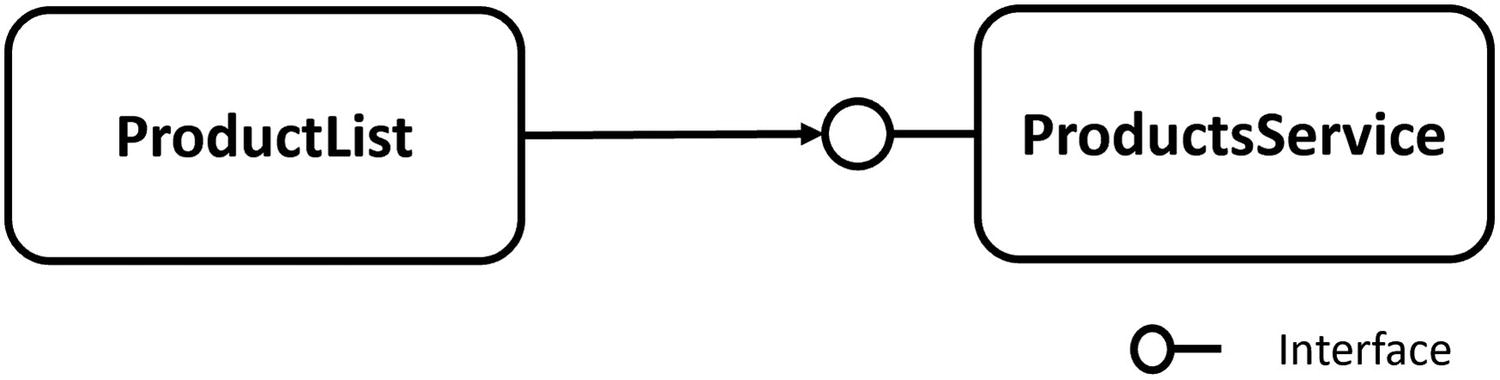
This component is now completely dependent on the ProductsService! This is known as tight coupling; see Figure 5-1.
Figure 5-1
Tight Coupling
Now you want to test the ProductList component, and ProductsService requires a server on the network to talk to. In this case, you will need to set up a server just to run the test. And if the server is not ready yet (the developer in charge of the server hasn’t come around to it), you cannot test your component! Or you are using the ProductsService in several places in your location, and you need to replace it with another class. Now you will need to find every use of the ProductsService and replace the class. What a maintenance nightmare!
Using the Dependency Inversion Principle
The dependency inversion principle states:
A. High-level modules should not depend on low-level modules. Both should depend on abstractions.
B. Abstractions should not depend on details. Details should depend on abstractions.
What this means is that the ProductsList component (the higher-level module) should not directly depend on the ProductsService (the lower-level module). Instead, it should rely on an abstraction. Using C# terminology: it should rely on an interface describing what a ProductsService should be able to do, not a class describing how it should work.
The IProductsService interface would look like Listing 5-2.
public interface IProductsService
{
IEnumerable<Product> GetProducts();
}
Listing 5-2
The Abstraction As Described in an Interface
And we change the ProductsList component to rely on this abstraction, as in Listing 5-3. Please note that we still need to assign an instance to the productService variable.
@using Dependency.Inversion.Shared
@foreach (var product in productsService.GetProducts())
{
<div>@product.Name</div>
<div>@product.Description</div>
<div>@product.Price</div>
}
@code
{
private IProductsService productsService;
}
Listing 5-3
The ProductList Component Using the IProductsService Interface
Now the ProductList component (the high-level module from earlier) only relies on the IProductsService interface, an abstraction. And the abstraction does not reveal how we will implement the GetProducts method.
Of course, now we make the ProductsService (which is the low-level module) implement the IProductsService interface as in Listing 5-4.
public class ProductsService : IProductsService
{
public IEnumerable<Product> GetProducts()
=> ...
}
Listing 5-4
The ProductsService Implementing the IProductsService Interface
If you want to test the ProductList component implemented using dependency inversion, you build a hard-coded version of the IProductsService and run the test without needing a server, for example, in Listing 5-5. We will discuss some of these techniques for testing in a later chapter.
public class HardCodedProductsService : IProductsService
{
public IEnumerable<Product> GetProducts()
{
yield return new Product
{
Name = "Isabelle's Homemade Marmelade",
Description = "...",
Price = 1.99M
};
yield return new Product
{
Name = "Liesbeth's Applecake",
Description = "...",
Price = 3.99M
};
}
}
Listing 5-5
A Hard-Coded IProductsService Used for Testing
If you are using the IProductsService interface in different places in your application (instead of the ProductsService class), all you need to do to replace its implementation is to build another class that implements the IProductsService interface and tell your application to use the other class!
By applying the dependency inversion principle (see Figure 5-2), we gained a lot more flexibility.
Figure 5-2
Loosely Coupled Objects Through Dependency Inversion
Adding Dependency Injection
If you were to run this application, you would get a NullReferenceException. Why? Because the ProductsList component from Listing 5-3 still needs an instance of a class implementing IProductsService! We could pass the ProductsService in the constructor of the ProductList component, for example, in Listing 5-6.
new ProductList(new ProductsService())
Listing 5-6
Passing the ProductsService in the Constructor
But if the ProductsService also depends on another class, it quickly becomes like Listing 5-7. This is of course not a practical way of working! Because of that, we will use an Inversion-of-Control Container (I didn’t invent this name!).
new ProductList( new ProductsService(new Dependency()))
Listing 5-7
Creating a Deep Chain of Dependencies Manually
Using an Inversion-of-Control Container
An Inversion-of-Control Container(IoCC) is just another object, which specializes in creating objects for you. You simply ask it to create for you an instance of a type, and it will take care of creating any dependencies it requires.
It is a little bit like in a movie where a surgeon, in the middle of an operation, needs a scalpel. The surgeon in the movie holds out his (or her) hand and asks for “Scalpel number 5!”. The nurse (the Inversion-of-Control Container) who is assisting simply hands the surgeon the scalpel. The surgeon doesn’t care where the scalpel comes from or how it was built.
So, how can the IoCC know which dependencies your component needs? There are a couple of ways, heavily depending on the IoCC.
Constructor Dependency Injection
Classes that need a dependency can simply state their dependencies in their constructor. The IoCC will examine the constructor and instantiate the dependencies before calling the constructor. And if these dependencies have their own dependencies, then the IoCC will also build them! For example, if the ProductsService has a constructor that takes an argument of type Dependency, as in Listing 5-8, then the IoCC will create an instance of type Dependency and will then call the ProductsService’s constructor with that instance. The ProductsService constructor then stores a reference to the dependency in some field, as in Listing 5-8. Should the ProductsService’s constructor take multiple arguments, then the IoCC will pass an instance for each argument. Constructor injection is normally used for required dependencies.
public class ProductsService
{
private readonly Dependency dep;
public ProductsService(Dependency dep)
{
this.dep = dep;
}
}
Listing 5-8
The ProductsService’s Constructor with Arguments
Property Dependency Injection
If the class that the IoCC needs to build has properties that indicate a dependency, then these properties are filled in by the IoCC. The way a property does that depends on the IoCC (in .NET, there are a couple of different IoCC frameworks; some of these use an attribute on the property), but in Blazor, you can have the IoCC inject an instance with the @inject directive in your razor file, for example, the second line of code in Listing 5-9.
@using Dependency.Inversion.Shared
@inject IProductsService productsService
@foreach (var product in productsService.GetProducts())
{
<div>@product.Name</div>
<div>@product.Description</div>
<div>@product.Price</div>
}
@code
{
}
Listing 5-9
Injecting a Dependency with the @inject Directive
If you’re using code separation, you can add a property to your class and apply the [Inject] attribute as in Listing 5-10. Since this listing is using nullable reference types, we need to assign a default! to remove the compiler warning.
public partial class ProductList
{
[Inject]
public IProductsService ProductsService { get; set; }
= default!;
}
Listing 5-10
Using the Inject Attribute for Property Injection
You can then use this property directly in your razor file, as in Listing 5-11.
@foreach (var product in productsService.GetProducts())
{
<div>@product.Name</div>
<div>@product.Description</div>
<div>@product.Price</div>
}
Listing 5-11
Using the ProductsService Property that Was Dependency Injected
Configuring Dependency Injection
There is one more thing we need to discuss. When your dependency is a class, then the IoCC can easily know that it needs to create an instance of the class with the class’s constructor. But if your dependency is an interface, which it generally needs to be if you are applying the principle of dependency inversion, then which class does it use to create the instance? Without your help, it cannot know.
An IoCC has a mapping between interfaces and classes, and it is your job to configure this mapping. You configure the mapping in your Blazor WebAssembly project’s Program class (and in the Startup class for Blazor Server). So open Program.cs, as in Listing 5-12.
using Microsoft.AspNetCore.Components.WebAssembly.Hosting;
using Microsoft.Extensions.DependencyInjection;
using System;
using System.Net.Http;
using System.Threading.Tasks;
namespace Dependency.Inversion.Client
{
public class Program
{
public static async Task Main(string[] args)
{
var builder = WebAssemblyHostBuilder.CreateDefault(args);
builder.RootComponents.Add<App>("#app");
builder.Services.AddScoped(sp => new HttpClient
{
BaseAddress =
new Uri(builder.HostEnvironment.BaseAddress)
});
await builder.Build().RunAsync();
}
}
}
Listing 5-12
The Program Class
The Program class creates a builder instance, which has a property Services of type IServiceCollection. It is this IServiceCollection we need to configure. If you are familiar with ASP.NET Core, it is the same type used in the ConfigureServices method from the Startup class.
To configure the mapping for the IoCC, you use extension methods on the IServiceCollection instance. Which extension method you call depends on the lifetime you want to give the dependency. There are three options for the lifetime of an instance which we will discuss next.
Note
The lifetime of instances is different for Blazor WebAssembly and Blazor Server. It is even different from the lifetime you know from ASP.NET Core!
Singleton Dependencies
Singleton classes are classes that only have one instance (in the application’s scope). These are typically used to manage some global state. For example, you could have a class that keeps track of how many times people have clicked a certain product. Having multiple instances of this class would complicate things because they will have to start communicating with each other to keep track of the clicks. Singleton classes can also be classes that don’t have any state and that only have behavior (utility classes such as one that does conversions between imperial and metric units). In this case, you could have multiple instances, but this is just wasteful and will make the garbage collector work harder.
You configure dependency injection to reuse the same instance all the time with the AddSingleton extension method, for example, Listing 5-13. Every time the IoCC needs an instance of the IProductsService interface, it will use an instance of the ProductService class.
There is an overload available (Listing 5-14) that allows you to create the singleton instance yourself and then tell IoCC to use that instance.
ProductsService productsService = new ProductsService();
builder.Services
.AddSingleton<IProductsService>(productsService);
Listing 5-14
Create the Singleton Yourself
In case your class does not have an interface, you can also use Listing 5-15.
builder.Services
.AddSingleton<ProductsService>();
Listing 5-15
Adding a Singleton to Dependency Injection
Why not use static methods instead of singletons you say? Static methods and properties are very hard to replace with fake implementations during testing (have you ever tried to test a method that uses a date with DateTime.Now, and you want to test it with February 29 of some quantum leap year?). During testing, you can easily replace the real class with a fake class because it implements an interface!
Now about the difference between Blazor WebAssembly and Blazor Server. In Blazor WebAssembly, your application is running in a browser’s tab. You can even have multiple copies of the same Blazor application running in different tabs of your browser (even different browsers). Each tab will have its own singleton instance, in the memory of that browser tab. So you cannot use singletons to share state between tabs with Blazor WASM. And when you refresh the tab, the application will re-initialize with a new instance for the singleton.
With Blazor Server, the application is running on the server. So here the singleton is actually shared among every user running the Blazor application on the same server! But even here your application can be hosted with several servers, and each server will have its own singleton!
Transient Dependencies
Transient means short lived. In .NET, there are a lot of objects which are short lived, which might not even survive beyond a single method call. For example, when you are concatenating a couple of strings, the intermediate strings are thrown away almost instantly after being created. Using transient objects makes a lot of sense when you don’t want to be affected by the previous state of an object. Instead, you start with a fresh slate by creating a new instance.
When you configure dependency injection to use a transient lifetime for a class, each time an instance is needed by the IoCC, it will create a fresh instance.
You configure dependency injection to use transient instances with the AddTransient extension method, as in Listing 5-16.
However, in Blazor we are working client side, and in that case, the UI stays put for the entire interaction. This means that you will have components that only have one created instance and only one instance of the dependency. You might think in that case transient and singleton will do the same thing. But there can be another component that needs the same type of dependency. If you are using a singleton, then both components will share the same instance of the dependency, while transient each gets a unique instance! You should be aware of this.
Scoped Dependencies
When you configure dependency injection to use a scoped dependency, the IoCC will reuse the same instance per scope but uses new instances between different scopes. But what does a scope mean?
Again there is a difference between Blazor WASM and Blazor Server. In Blazor WASM, the scope is the application (running in the browser) itself. With Blazor WASM, a scoped instance will have the same lifetime as a singleton.
Blazor Server uses a circuit which is the SignalR connection to keep track of a single user’s application (somewhat like a session). This circuit spans across HTTP requests but not across the SignalR connection used with Blazor Server.
You configure the dependency to use scoped lifetime with the AddScoped extension method as in Listing 5-17.
builder.Services
.AddScoped<IProductsService, ProductsService>();
builder.Services
.AddScoped<ProductsService>();
Listing 5-17
Registering a Class to Use Scoped Lifetime
Understanding Blazor Dependency Lifetime
Let’s look at the lifetime of the injected dependencies in Blazor. For this, I have written a demo app which you can find in the included sources for this book.
The source code for this book is available on GitHub via the book’s product page, located at www.apress.com/ISBN.
I started by building three services, each one with a different lifetime (determined through the configuration of dependency injection). For example, see Listing 5-18. Every time an instance gets created, it gets assigned a GUID. By displaying the instance’s GUID, it becomes easy to see which instance gets replaced with a new instance. These classes also implement IDisposable so we can see when they get disposed by looking in the browser’s debugger console.
using System;
namespace Blazor.LifeTime.Shared
{
public class SingletonService : IDisposable
{
public Guid Guid { get; set; } = Guid.NewGuid();
public void Dispose()
=> Console.WriteLine("ScopedService Disposed");
}
}
Listing 5-18
One of the Dependencies Used for the Experiment
Then I added these three services to the service collection, as in Listing 5-19 (Blazor WASM) and Listing 5-20 (Blazor Server).
using Blazor.LifeTime.Shared;
using Microsoft.AspNetCore.Components.WebAssembly.Hosting;
using Microsoft.Extensions.DependencyInjection;
using System;
using System.Net.Http;
using System.Threading.Tasks;
namespace Blazor.Wasm.LifeTime
{
public class Program
{
public static async Task Main(string[] args)
{
var builder = WebAssemblyHostBuilder.CreateDefault(args);
builder.RootComponents.Add<App>("#app");
builder.Services.AddScoped(sp => new HttpClient
{
BaseAddress = new Uri(builder.HostEnvironment.BaseAddress)
public void ConfigureServices(IServiceCollection services)
{
services.AddRazorPages();
services.AddServerSideBlazor();
services.AddSingleton<WeatherForecastService>();
services.AddSingleton<SingletonService>();
services.AddTransient<TransientService>();
services.AddScoped<ScopedService>();
}
Listing 5-20
Adding the Dependencies for Blazor Server (Excerpt)
And finally, I consume these services in the Index component from Listing 5-21. This will display GUIDs for each dependency (don’t forget to add the proper @using to _Imports.razor).
@page "/"
@inject SingletonService singletonService
@inject TransientService transientService
@inject ScopedService scopedService
<div>
<h1>Singleton</h1>
Guid: @singletonService.Guid
<h1>Transient</h1>
Guid: @transientService.Guid
<h1>Scoped</h1>
Guid: @scopedService.Guid
</div>
Listing 5-21
The Component Consuming the Dependencies
Blazor WebAssembly Experiment
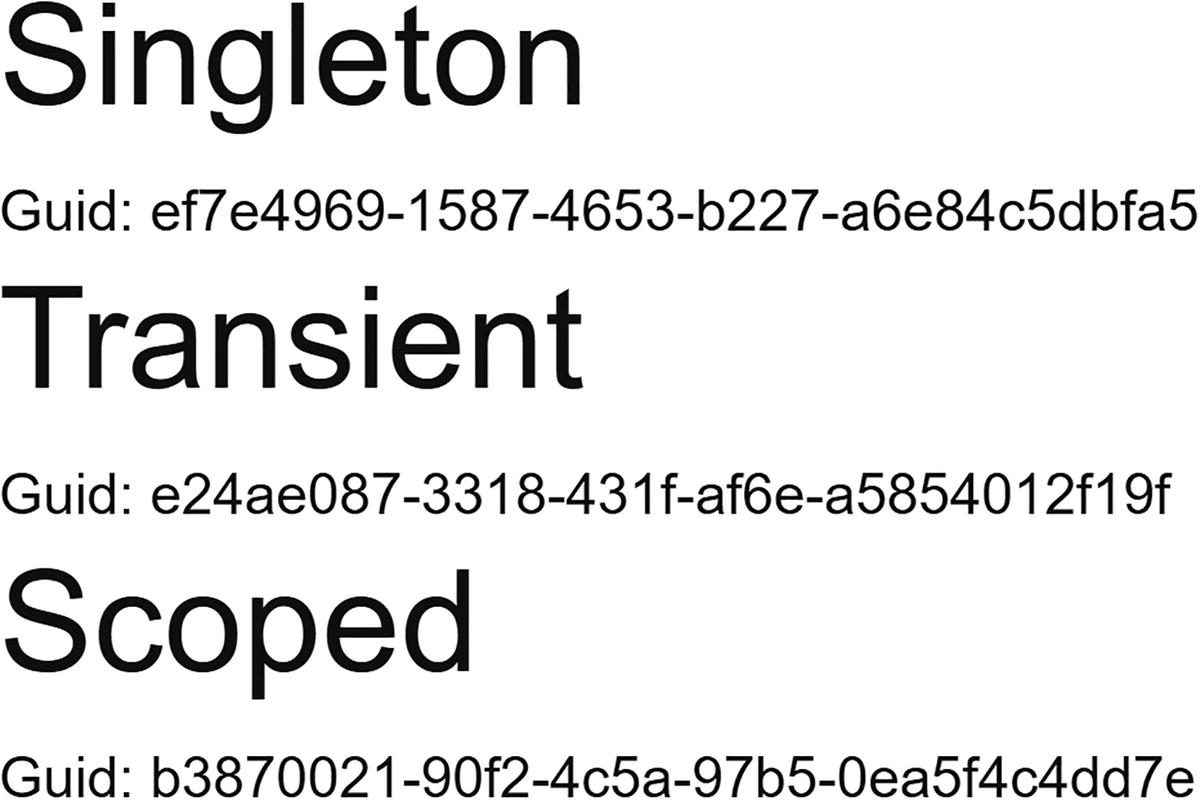
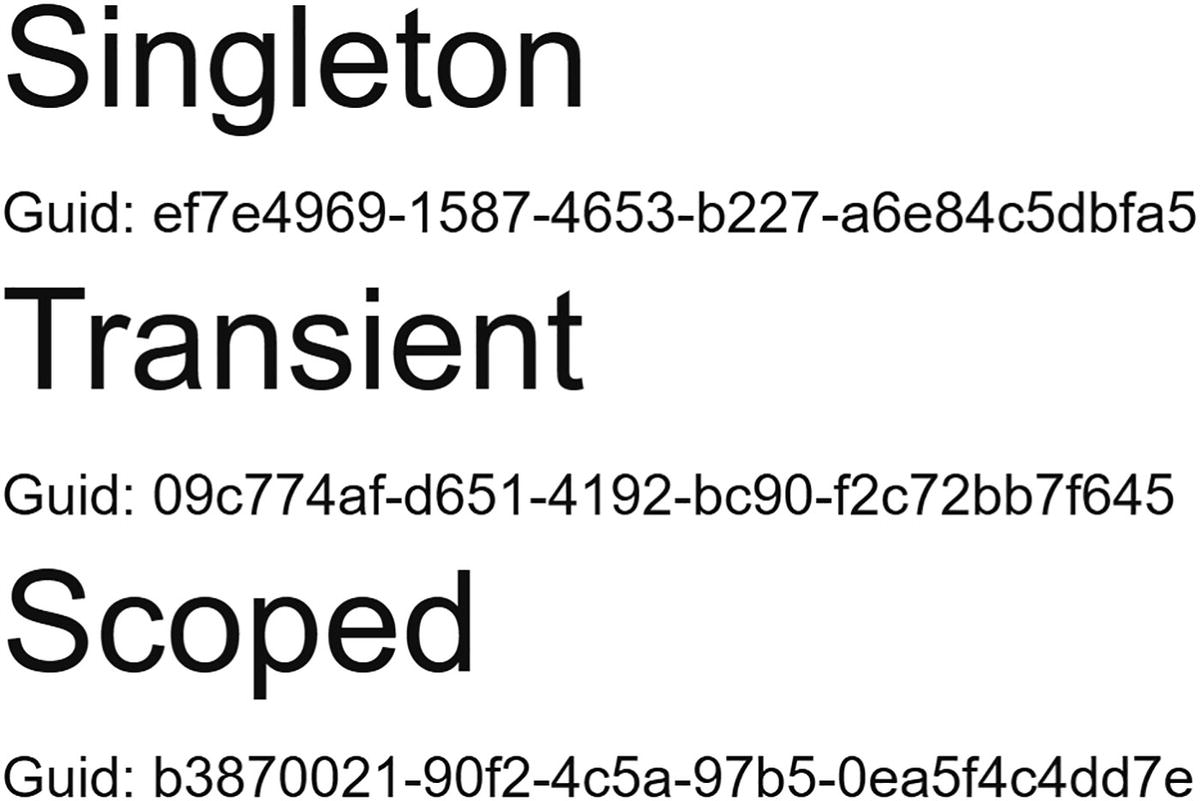
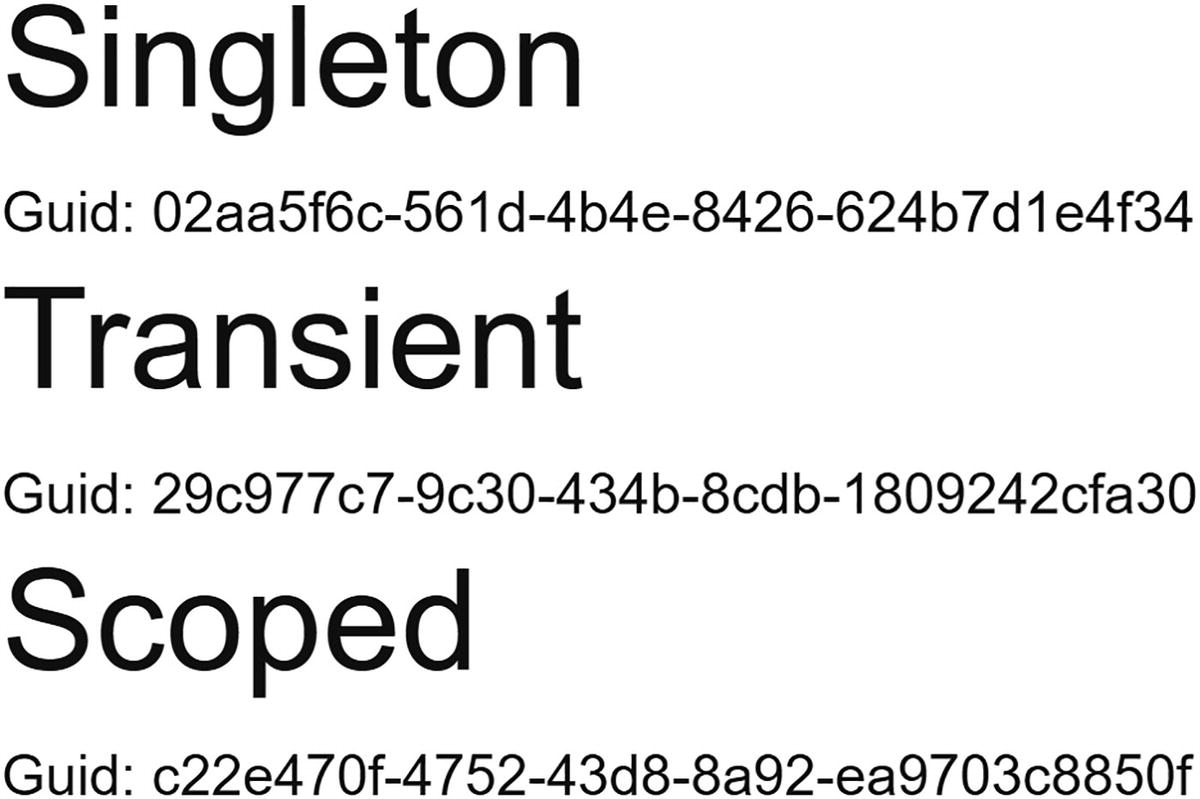
Run the Blazor.Wasm.Lifetime project, which will start Blazor WebAssembly. We get Figure 5-3 on the first page (your GUIDs will be different). Switching to the Counter page and back shows Figure 5-4.
Figure 5-3
Displaying Client-Side Blazor Dependencies
Figure 5-4
The Dependencies from the Other Page
Each time the Index component gets created, it will ask dependency injection for instances of the SingletonService, TransientService, and ScopedService. The SingletonService instance gets reused all the time because we see the same GUID. The TransientService instance gets replaced each time (because each time we get a different GUID). We also see the same instance for the ScopedService. In Blazor WebAssembly, scoped instances are scoped by default to the browser’s tab (the application); they behave like singletons, so there is no difference.
And what if we open another tab? Since we have a fresh copy of the Blazor application running in the other tab, we get a new instance for the singleton, and because the scope is the connection, we get another instance of the scoped instance. If you expected to see the same instance for the singleton in both tabs, please remember that here each tab holds another copy of the Blazor application.
When do our instances get disposed? Both the singleton and scoped instance will live as long as your application is running, so these are not disposed. But what about the transient instance? If you really need to have a transient instance disposed when the component gets disposed, you need to implement the IDisposable interface as in Listing 5-22 on the component and call Dispose on the transient instance yourself! Or use OwningComponentBase (later).
@page "/"
@inject SingletonService singletonService
@inject TransientService transientService
@inject ScopedService scopedService
@implements IDisposable
<div>
<h1>Singleton</h1>
Guid: @singletonService.Guid
<h1>Transient</h1>
Guid: @transientService.Guid
<h1>Scoped</h1>
Guid: @scopedService.Guid
</div>
@code {
public void Dispose()
=> transientService.Dispose();
}
Listing 5-22
Implementing IDisposable on a Component
Blazor Server Experiment
Now run the Blazor.Server.LifeTime project; make sure you are running the server using Kestrel and not IIS. Your browser should open on the Index page as in Figure 5-5. Select the Counter page and back to the Index page to see Figure 5-6 (again, you will have different GUIDs).
Figure 5-5
Displaying Server-Side Dependencies
Figure 5-6
After Clicking the Other Link
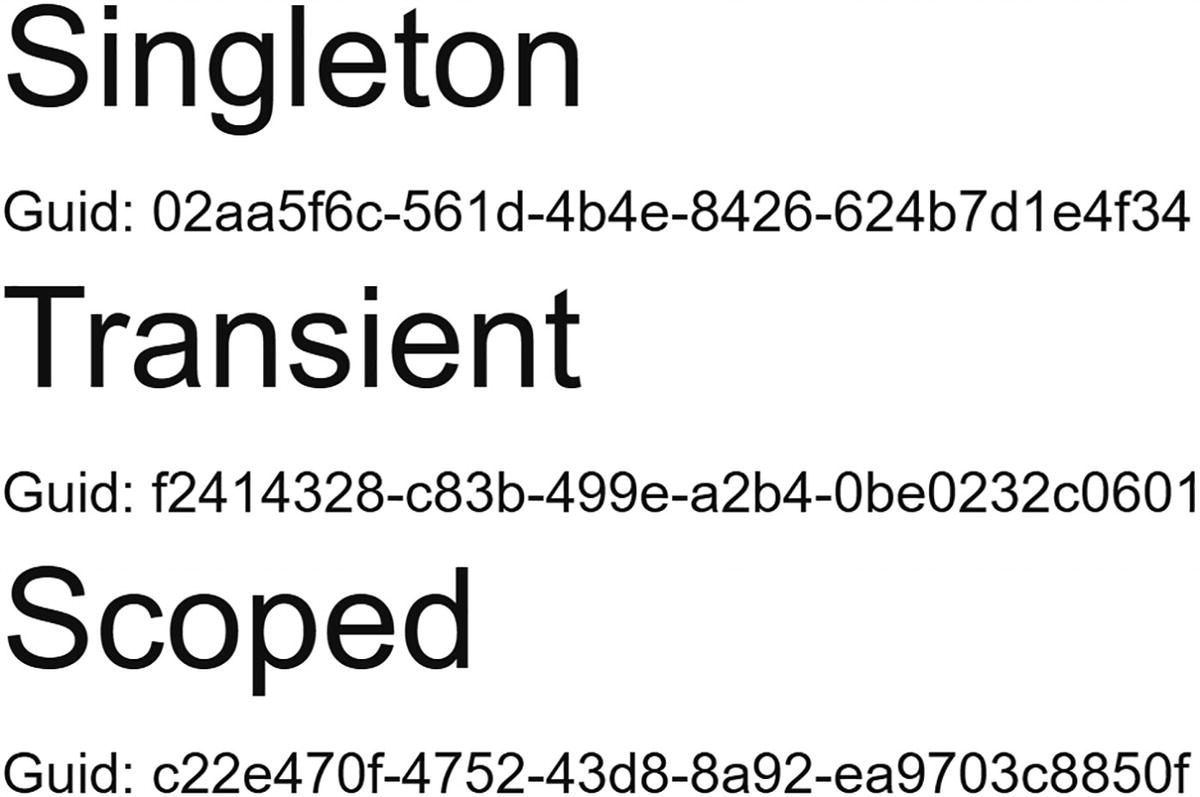
Here, we see similar behavior like the one we saw for Blazor WASM. But don’t get fooled. This is not the same, and we can see that by opening another tab. You should see the same GUID for the singleton instance as in Figure 5-7. Now we are running on the server, and the server will have one instance of the singleton for all users. Open the page in another browser; again, you will see the same GUID.
Figure 5-7
Opening Another Tab with Server-Side on the Home Page
Using OwningComponentBase
What if you want a service instance that belongs to your component and you want this instance to be disposed automatically when the component gets disposed? You can make your component create its own scope by deriving from the OwningComponentBase class. Look at Listing 5-23 which is the OwningComponent which you can find in the provided project. Here, we inherit from OwningComponentBase. Instead of using regular dependency injection, the OwningComponentBase class has the ScopedServices property which is an IServiceProvider. Any scoped instances should be created through the ScopedServices’ GetService or GetRequiredService method. These instances now belong to the component’s scope and will automatically be disposed when the component is disposed.
If you only need one scoped instance, you can also use the generic OwningComponentBase<T> base class, which has a Service property of type T which will hold the scoped instance of type T. Listing 5-24 shows an example of this. You can still use the ScopedServices property if you need to create additional scoped instances.
@inherits OwningComponentBase<ScopedService>
<h1>OwningComponent2</h1>
Guid: @Service.Guid
Listing 5-24
Using OwningComponentBase<T>
Now add both these components to the Index component as in Listing 5-25. You can choose between Blazor Server and Blazor WebAssembly.
@page "/"
@inject SingletonService singletonService
@inject TransientService transientService
@inject ScopedService scopedService
<div>
<h1>Singleton</h1>
Guid: @singletonService.Guid
<h1>Transient</h1>
Guid: @transientService.Guid
<h1>Scoped</h1>
Guid: @scopedService.Guid
<OwningComponent/>
<OwningComponent2/>
</div>
Listing 5-25
Using OwningComponentBase Derived Components
Run your project and make sure you have the console open. Now click the Counter component. The console should show the ScopedService instances being disposed. Also note that each time the OwningComponent and OwningComponent2 get instantiated, they receive a new instance of the ScopedService.
Note
Don’t implement IDisposable on components deriving from OwningComponentBase because this will cease the automatic disposal of the scoped instances!
The Result of the Experiment
Now the experiment is complete, let us draw some conclusions about the lifetime of the injected dependencies. Every time an instance gets created, it gets a new GUID. This makes it easy to see if a new instance gets created or the same instance gets reused.
Transient lifetime is easy. Transient lifetime means you get a new instance every time. This is the same for both Blazor WASM and Blazor Server.
Singleton lifetime means that in Blazor WASM you get one instance for the entire duration of the application. If you really need to share an instance between all the uses and tabs, you need to put this on the server and access it through calls to the server. But with Blazor Server, everyone uses the same instance. Please make sure you don’t put any user’s information in a singleton because this will bleed to other users (bad!).
Scoped lifetime with Blazor WASM means the same as singleton lifetime. But with Blazor Server, we need to be careful. Blazor Server uses a SignalR connection (called a circuit) between the browser and the server, and scoped instances are linked to the circuit. You can derive from the OwningComponentBase class if you need scoped behavior for a specific component.
For both Blazor WebAssembly and Blazor Server, if you need to have the same instance, no matter which tab the user is using, you cannot rely on dependency injection to do this for you. You will need to do some state handling yourself! More about this in Chapter 11.
Building Pizza Services
Let’s go back to our PizzaPlace project and introduce it to some services. I can think of at least two services, one to retrieve the menu and one to place the order when the user clicks the Order button. For the moment, these services will be very simple, but later we will use these to set up communication with a server.
Start by reviewing the Index component, which is Listing 5-26 with the markup left out for conciseness.
@code {
private State State { get; } = new State();
protected override void OnInitialized()
{
State.Menu.Add(
new Pizza(1, "Pepperoni", 8.99M, Spiciness.Spicy));
State.Menu.Add(
new Pizza(2, "Margarita", 7.99M, Spiciness.None));
State.Menu.Add(
new Pizza(3, "Diabolo", 9.99M, Spiciness.Hot));
}
private void AddToBasket(Pizza pizza)
=> State.Basket.Add(pizza.Id);
private void RemoveFromBasket(int pos)
=> State.Basket.RemoveAt(pos);
private void PlaceOrder()
{
Console.WriteLine("Placing order");
}
}
Listing 5-26
The Index Component
Pay special attention to the State property. We will initialize the State.Menu property from the MenuService service (which we will build next), and we will use dependency injection to pass the service.
Adding the MenuService and IMenuService Abstraction
If you are using Visual Studio, right-click the PizzaPlace.Shared project and select Add ➤ New Item. If you are using Code, right-click the PizzaPlace.Shared project and select Add File. Add a new interface class IMenuService and complete it as in Listing 5-27.
using System.Threading.Tasks;
namespace PizzaPlace.Shared
{
public interface IMenuService
{
ValueTask<Menu> GetMenu();
}
}
Listing 5-27
The IMenuService Interface
This interface allows us to retrieve a menu. Note that the GetMenu method returns a ValueTask<Menu>; that is because we expect the service to retrieve our menu from a server (we will build this in the following chapters) and we want the method to support an asynchronous call.
Let’s elaborate on this. First, update the Index component’s OnInitializedAsync method (don’t forget the @inject at the top) as in Listing 5-28. This is an asynchronous method using the async keyword in its declaration.
Never call asynchronous services in your Blazor component’s constructor; always use OnInitializedAsync or OnParametersSetAsync.
Inside the OnInitializedAsync method, we call the GetMenu method using the await keyword which requires GetMenu to return a Task<Menu> or ValueTask<T>. But why a ValueTask<T> and not Task<T>? Because I don’t know how someone will implement the GetMenu method. They may do this synchronously, for example, by retrieving it from a cache, and then using a Task<T> is more expensive than a ValueTask<T>. Also, the ValueTask<T> is a value type, meaning that this one does not end up on the heap in the synchronous case. If you want to learn more about this, Apress has an excellent book about all of this called Pro .NET Memory Management: For Better Code, Performance, and Scalability.
@page "/"
@inject IMenuService MenuService
<!-- Menu -->
<PizzaList Title="Our Selection of Pizzas"
Items="@State.Menu.Pizzas"
ButtonTitle="Order"
ButtonClass="btn btn-success pl-4 pr-4"
Selected="@AddToBasket" />
<!-- End menu -->
<!-- Shopping Basket -->
<ShoppingBasket Orders="@State.Basket.Orders"
GetPizzaFromId="@State.Menu.GetPizza"
Selected="@RemoveFromBasket" />
<!-- End shopping basket -->
<!-- Customer entry -->
<CustomerEntry Title="Please enter your details below"
We are not ready to run this application yet because we still not to configure dependency injection. But run it anyway! When you get the error, look at the browser’s debugger console. You should see the following error:
Unhandled exception rendering component: Cannot provide a value for property 'MenuService' on type 'PizzaPlace.Client.Pages.Index'. There is no registered service of type 'PizzaPlace.Shared.IMenuService'.
Dependency injection could not provide an instance for IMenuService. Of course, it can’t! We did implement this interface.
Add a new HardCodedMenuService class to the PizzaPlace.Shared project, as in Listing 5-29. The GetMenu method returns a new ValueTask<Menu> containing three different kinds of pizza.
using System.Collections.Generic;
using System.Threading.Tasks;
namespace PizzaPlace.Shared
{
public class HardCodedMenuService : IMenuService
{
public ValueTask<Menu> GetMenu()
=> new ValueTask<Menu>(
new Menu
{
Pizzas = new List<Pizza> {
new Pizza(1, "Pepperoni", 8.99M, Spiciness.Spicy),
new Pizza(2, "Margarita", 7.99M, Spiciness.None),
new Pizza(3, "Diabolo", 9.99M, Spiciness.Hot)
}
});
}
}
Listing 5-29
The HardCodedMenuService Class
Now we are ready to use the IMenuService in our Index component.
Open Program.cs from the client project. We’ll use a transient object as stated in Listing 5-30.
using Microsoft.AspNetCore.Components.WebAssembly.Hosting;
using Microsoft.Extensions.DependencyInjection;
using PizzaPlace.Shared;
using System;
using System.Net.Http;
using System.Threading.Tasks;
namespace PizzaPlace.Client
{
public class Program
{
public static async Task Main(string[] args)
{
var builder = WebAssemblyHostBuilder.CreateDefault(args);
Configuring Dependency Injection for the MenuService
Run your Blazor project. Everything should still work! In the next chapters, we will replace this with a service to retrieve everything from a database on the server.
Ordering Pizzas with a Service
When the user makes a selection of pizzas and fulfills the customer information, we want to send the order to the server, so they can warm up the oven and send some nice pizzas to the customer’s address. Start by adding an IOrderService interface to the PizzaPlace.Shared project as in Listing 5-31.
using System.Threading.Tasks;
namespace PizzaPlace.Shared
{
public interface IOrderService
{
ValueTask PlaceOrder(ShoppingBasket basket);
}
}
Listing 5-31
The IOrderService Abstraction As a C# Interface
To place an order, we just send the basket to the server. In the next chapter, we will build the actual server-side code to place an order; for now, we will use a fake implementation that simply writes the order to the browser’s console. Add a class called ConsoleOrderService to the PizzaPlace.Shared project as in Listing 5-32.
using System;
using System.Threading.Tasks;
namespace PizzaPlace.Shared
{
public class ConsoleOrderService : IOrderService
{
public ValueTask PlaceOrder(ShoppingBasket basket)
{
Console.WriteLine($"Placing order for {basket.Customer.Name}");
return new ValueTask();
}
}
}
Listing 5-32
The ConsoleOrderService
The PlaceOrder method simply writes the basket to the console. However, this method implements the asynchronous pattern from .NET, so we need to return a new ValueTask instance.
Inject the IOrderService into the Index component as in Listing 5-33.
@page "/"
@inject IMenuService MenuService
@inject IOrderService orderService
Listing 5-33
Injecting the IOrderService
And use the order service when the user clicks the Order button by replacing the implementation of the PlaceOrder method in the Index component. Since the orderService returns a ValueTask (same with Task), we need to invoke it using the await syntax, as in Listing 5-34.
private async Task PlaceOrder()
{
await orderService.PlaceOrder(State.Basket);
}
Listing 5-34
The Asynchronous PlaceOrder Method
As the final step, configure dependency injection. Again, we will make the IOrderService transient as in Listing 5-35.
Configuring Dependency Injection for the OrderService
Think about this. How hard will it be to replace the implementation of one of the services? There is only one place that says which class we will be using, and that is in Program (or Startup with Blazor Server). In a later chapter, we will build the server-side code needed to store the menu and the orders, and in the chapter after that, we will replace these services with the real deal!
Build and run your project again, open your browser’s debugger, and open the console tab. Order some pizzas and click the Order button. You should see some feedback being written to the console.
Summary
In this chapter, we discussed dependency inversion, which is a best practice for building easily maintainable and testable object-oriented applications. We also saw that dependency injection makes it very easy to create objects with dependencies, especially objects that use dependency inversion. Then we looked at the dependency injection that comes with Blazor. When you configure dependency injection, you need to be careful with the lifetime of your instances, so let’s repeat that.
Transient objects are always different; a new instance is provided to every component and every service.
Scoped objects are the same for a user’s connection, but different across different users and connections. You can derive from the OwningComponentBase class if you need scoped behavior for a specific component.
Singleton objects are the same for every object and every request, but still have different lifetime between Blazor WebAssembly and Blazor Server.