08
Working with Common .NET Types
This chapter is about some common types that are included with .NET. These include types for manipulating numbers, text, collections, network access, reflection, and attributes; improving working with spans, indexes, and ranges; manipulating images; and internationalization.
This chapter covers the following topics:
- Working with numbers
- Working with text
- Working with dates and times
- Pattern matching with regular expressions
- Storing multiple objects in collections
- Working with spans, indexes, and ranges
- Working with network resources
- Working with reflection and attributes
- Working with images
- Internationalizing your code
Working with numbers
One of the most common types of data is numbers. The most common types in .NET for working with numbers are shown in the following table:
|
Namespace |
Example type(s) |
Description |
|
|
|
Integers; that is, zero and positive and negative whole numbers |
|
|
|
Cardinals; that is, zero and positive whole numbers |
|
|
|
Reals; that is, floating-point numbers |
|
|
|
Accurate reals; that is, for use in science, engineering, or financial scenarios |
|
|
|
Arbitrarily large integers, complex numbers, and quaternion numbers |
.NET has had the 32-bit float and 64-bit double types since .NET Framework 1.0. The IEEE 754 specification also defines a 16-bit floating point standard. Machine learning and other algorithms would benefit from this smaller, lower-precision number type so Microsoft introduced the System.Half type with .NET 5 and later.
Currently, the C# language does not define a half alias so you must use the .NET type System.Half. This might change in the future.
Working with big integers
The largest whole number that can be stored in .NET types that have a C# alias is about eighteen and a half quintillion, stored in an unsigned long integer. But what if you need to store numbers larger than that?
Let's explore numerics:
- Use your preferred code editor to create a new solution/workspace named
Chapter08. - Add a console app project, as defined in the following list:
- Project template: Console Application /
console - Workspace/solution file and folder:
Chapter08 - Project file and folder:
WorkingWithNumbers
- Project template: Console Application /
- In
Program.cs, delete the existing statements and add a statement to importSystem.Numerics, as shown in the following code:using System.Numerics; - Add statements to output the maximum value of the
ulongtype, and a number with 30 digits usingBigInteger, as shown in the following code:WriteLine("Working with large integers:"); WriteLine("-----------------------------------"); ulong big = ulong.MaxValue; WriteLine($"{big,40:N0}"); BigInteger bigger = BigInteger.Parse("123456789012345678901234567890"); WriteLine($"{bigger,40:N0}");The
40in the format code means right-align 40 characters, so both numbers are lined up to the right-hand edge. TheN0means use thousand separators and zero decimal places. - Run the code and view the result, as shown in the following output:
Working with large integers:
----------------------------------------
              18,446,744,073,709,551,615
 123,456,789,012,345,678,901,234,567,890
Working with complex numbers
A complex number can be expressed as a + bi, where a and b are real numbers, and i is an imaginary unit, where i2 = −1. If the real part a is zero, it is a pure imaginary number. If the imaginary part b is zero, it is a real number.
Complex numbers have practical applications in many STEM (science, technology, engineering, and mathematics) fields of study. Additionally, they are added by separately adding the real and imaginary parts of the summands; consider this:
(a + bi) + (c + di) = (a + c) + (b + d)i
Let's explore complex numbers:
- In
Program.cs, add statements to add two complex numbers, as shown in the following code:WriteLine("Working with complex numbers:"); Complex c1 = new(real: 4, imaginary: 2); Complex c2 = new(real: 3, imaginary: 7); Complex c3 = c1 + c2; // output using default ToString implementation WriteLine($"{c1} added to {c2} is {c3}"); // output using custom format WriteLine("{0} + {1}i added to {2} + {3}i is {4} + {5}i", c1.Real, c1.Imaginary, c2.Real, c2.Imaginary, c3.Real, c3.Imaginary); - Run the code and view the result, as shown in the following output:
Working with complex numbers:
(4, 2) added to (3, 7) is (7, 9)
4 + 2i added to 3 + 7i is 7 + 9i
Understanding quaternions
Quaternions are a number system that extends complex numbers. They form a four-dimensional associative normed division algebra over the real numbers, and therefore also a domain.
Huh? Yes, I know. I don't understand that either. Don't worry; we're not going to write any code using them! Suffice to say, they are good at describing spatial rotations, so video game engines use them, as do many computer simulations and flight control systems.
Working with text
One of the other most common types of data for variables is text. The most common types in .NET for working with text are shown in the following table:
|
Namespace |
Type |
Description |
|
|
|
Storage for a single text character |
|
|
|
Storage for multiple text characters |
|
|
|
Efficiently manipulates strings |
|
|
|
Efficiently pattern-matches strings |
Getting the length of a string
Let's explore some common tasks when working with text; for example, sometimes you need to find out the length of a piece of text stored in a string variable:
- Use your preferred code editor to add a new console app named
WorkingWithTextto theChapter08solution/workspace:- In Visual Studio, set the startup project for the solution to the current selection.
- In Visual Studio Code, select
WorkingWithTextas the active OmniSharp project.
- In the
WorkingWithTextproject, inProgram.cs, add statements to define a variable to store the name of the city London, and then write its name and length to the console, as shown in the following code:string city = "London"; WriteLine($"{city} is {city.Length} characters long."); - Run the code and view the result, as shown in the following output:
London is 6 characters long.
Getting the characters of a string
The string class uses an array of char internally to store the text. It also has an indexer, which means that we can use the array syntax to read its characters. Array indexes start at zero, so the third character will be at index 2.
Let's see this in action:
- Add a statement to write the characters at the first and third positions in the
stringvariable, as shown in the following code:WriteLine($"First char is {city[0]} and third is {city[2]}."); - Run the code and view the result, as shown in the following output:
First char is L and third is n.
Splitting a string
Sometimes, you need to split some text wherever there is a character, such as a comma:
- Add statements to define a single
stringvariable containing comma-separated city names, then use theSplitmethod and specify that you want to treat commas as the separator, and then enumerate the returned array ofstringvalues, as shown in the following code:string cities = "Paris,Tehran,Chennai,Sydney,New York,Medellín"; string[] citiesArray = cities.Split(','); WriteLine($"There are {citiesArray.Length} items in the array."); foreach (string item in citiesArray) { WriteLine(item); } - Run the code and view the result, as shown in the following output:
There are 6 items in the array.
Paris
Tehran
Chennai
Sydney
New York
Medellín
Later in this chapter, you will learn how to handle more complex scenarios.
Getting part of a string
Sometimes, you need to get part of some text. The IndexOf method has nine overloads that return the index position of a specified char or string within a string. The Substring method has two overloads, as shown in the following list:
Substring(startIndex, length): returns a substring starting atstartIndexand containing the nextlengthcharacters.Substring(startIndex): returns a substring starting atstartIndexand containing all characters up to the end of the string.
Let's explore a simple example:
- Add statements to store a person's full name in a
stringvariable with a space character between the first and last name, find the position of the space, and then extract the first name and last name as two parts so that they can be recombined in a different order, as shown in the following code:string fullName = "Alan Jones"; int indexOfTheSpace = fullName.IndexOf(' '); string firstName = fullName.Substring( startIndex: 0, length: indexOfTheSpace); string lastName = fullName.Substring( startIndex: indexOfTheSpace + 1); WriteLine($"Original: {fullName}"); WriteLine($"Swapped: {lastName}, {firstName}"); - Run the code and view the result, as shown in the following output:
Original: Alan Jones
Swapped: Jones, Alan
If the format of the initial full name was different, for example, "LastName, FirstName", then the code would need to be different. As an optional exercise, try writing some statements that would change the input "Jones, Alan" into "Alan Jones".
Checking a string for content
Sometimes, you need to check whether a piece of text starts or ends with some characters or contains some characters. You can achieve this with methods named StartsWith, EndsWith, and Contains:
- Add statements to store a
stringvalue and then check if it starts with or contains a couple of differentstringvalues, as shown in the following code:string company = "Microsoft"; bool startsWithM = company.StartsWith("M"); bool containsN = company.Contains("N"); WriteLine($"Text: {company}"); WriteLine($"Starts with M: {startsWithM}, contains an N: {containsN}"); - Run the code and view the result, as shown in the following output:
Text: Microsoft
Starts with M: True, contains an N: False
Joining, formatting, and other string members
There are many other string members, as shown in the following table:
|
Member |
Description |
|
|
These methods trim whitespace characters such as space, tab, and carriage return from the beginning and/or end. |
|
|
These convert all the characters into uppercase or lowercase. |
|
|
These methods insert or remove some text. |
|
|
This replaces some text with other text. |
|
|
This can be used instead of allocating memory each time you use a literal |
|
|
This concatenates two |
|
|
This concatenates one or more |
|
|
This checks whether a |
|
|
This checks whether a |
|
|
An alternative method to string interpolation for outputting formatted |
Some of the preceding methods are static methods. This means that the method can only be called from the type, not from a variable instance. In the preceding table, I indicated the static methods by prefixing them with string., as in string.Format.
Let's explore some of these methods:
- Add statements to take an array of string values and combine them back together into a single string variable with separators using the
Joinmethod, as shown in the following code:string recombined = string.Join(" => ", citiesArray); WriteLine(recombined); - Run the code and view the result, as shown in the following output:
Paris => Tehran => Chennai => Sydney => New York => Medellín - Add statements to use positioned parameters and interpolated string formatting syntax to output the same three variables twice, as shown in the following code:
string fruit = "Apples"; decimal price = 0.39M; DateTime when = DateTime.Today; WriteLine($"Interpolated: {fruit} cost {price:C} on {when:dddd}."); WriteLine(string.Format("string.Format: {0} cost {1:C} on {2:dddd}.", arg0: fruit, arg1: price, arg2: when)); - Run the code and view the result, as shown in the following output:
Interpolated:  Apples cost £0.39 on Thursday.
string.Format: Apples cost £0.39 on Thursday.
Note that we could have simplified the second statement because WriteLine supports the same format codes as string.Format, as shown in the following code:
WriteLine("WriteLine: {0} cost {1:C} on {2:dddd}.",
  arg0: fruit, arg1: price, arg2: when);
Building strings efficiently
You can concatenate two strings to make a new string using the String.Concat method or simply by using the + operator. But both of these choices are bad practice because .NET must create a completely new string in memory.
This might not be noticeable if you are only adding two string values, but if you concatenate inside a loop with many iterations, it can have a significant negative impact on performance and memory use. In Chapter 12, Improving Performance and Scalability Using Multitasking, you will learn how to concatenate string variables efficiently using the StringBuilder type.
Working with dates and times
After numbers and text, the next most popular types of data to work with are dates and times. The two main types are as follows:
DateTime: represents a combined date and time value for a fixed point in time.TimeSpan: represents a duration of time.
These two types are often used together. For example, if you subtract one DateTime value from another, the result is a TimeSpan. If you add a TimeSpan to a DateTime then the result is a DateTime value.
Specifying date and time values
A common way to create a date and time value is to specify individual values for the date and time components like day and hour, as described in the following table:
|
Date/time parameter |
Value range |
|
|
1 to 9999 |
|
|
1 to 12 |
|
|
1 to the number of days in that month |
|
|
0 to 23 |
|
|
0 to 59 |
|
|
0 to 59 |
An alternative is to provide the value as a string to be parsed, but this can be misinterpreted depending on the default culture of the thread. For example, in the UK, dates are specified as day/month/year, compared to the US, where dates are specified as month/day/year.
Let's see what you might want to do with dates and times:
- Use your preferred code editor to add a new console app named
WorkingWithTimeto theChapter08solution/workspace. - In Visual Studio Code, select
WorkingWithTimeas the active OmniSharp project. - In
Program.cs, delete the existing statements and then add statements to initialize some special date/time values, as shown in the following code:WriteLine("Earliest date/time value is: {0}", arg0: DateTime.MinValue); WriteLine("UNIX epoch date/time value is: {0}", arg0: DateTime.UnixEpoch); WriteLine("Date/time value Now is: {0}", arg0: DateTime.Now); WriteLine("Date/time value Today is: {0}", arg0: DateTime.Today); - Run the code and note the results, as shown in the following output:
Earliest date/time value is: 01/01/0001 00:00:00 UNIX epoch date/time value is: 01/01/1970 00:00:00 Date/time value Now is: 23/04/2021 14:14:54 Date/time value Today is: 23/04/2021 00:00:00 - Add statements to define Christmas Day in 2021 (if this is in the past then use a future year) and display it in various ways, as shown in the following code:
DateTime christmas = new(year: 2021, month: 12, day: 25); WriteLine("Christmas: {0}", arg0: christmas); // default format WriteLine("Christmas: {0:dddd, dd MMMM yyyy}", arg0: christmas); // custom format WriteLine("Christmas is in month {0} of the year.", arg0: christmas.Month); WriteLine("Christmas is day {0} of the year.", arg0: christmas.DayOfYear); WriteLine("Christmas {0} is on a {1}.", arg0: christmas.Year, arg1: christmas.DayOfWeek); - Run the code and note the results, as shown in the following output:
Christmas: 25/12/2021 00:00:00 Christmas: Saturday, 25 December 2021 Christmas is in month 12 of the year. Christmas is day 359 of the year. Christmas 2021 is on a Saturday. - Add statements to perform addition and subtraction with Christmas, as shown in the following code:
DateTime beforeXmas = christmas.Subtract(TimeSpan.FromDays(12)); DateTime afterXmas = christmas.AddDays(12); WriteLine("12 days before Christmas is: {0}", arg0: beforeXmas); WriteLine("12 days after Christmas is: {0}", arg0: afterXmas); TimeSpan untilChristmas = christmas - DateTime.Now; WriteLine("There are {0} days and {1} hours until Christmas.", arg0: untilChristmas.Days, arg1: untilChristmas.Hours); WriteLine("There are {0:N0} hours until Christmas.", arg0: untilChristmas.TotalHours); - Run the code and note the results, as shown in the following output:
12 days before Christmas is: 13/12/2021 00:00:00 12 days after Christmas is: 06/01/2022 00:00:00 There are 245 days and 9 hours until Christmas. There are 5,890 hours until Christmas. - Add statements to define the time on Christmas Day that your children might wake up to open presents, and display it in various ways, as shown in the following code:
DateTime kidsWakeUp = new( year: 2021, month: 12, day: 25, hour: 6, minute: 30, second: 0); WriteLine("Kids wake up on Christmas: {0}", arg0: kidsWakeUp); WriteLine("The kids woke me up at {0}", arg0: kidsWakeUp.ToShortTimeString()); - Run the code and note the results, as shown in the following output:
Kids wake up on Christmas: 25/12/2021 06:30:00
The kids woke me up at 06:30
Globalization with dates and times
The current culture controls how dates and times are parsed:
- At the top of
Program.cs, import theSystem.Globalizationnamespace. - Add statements to show the current culture that is used to display date and time values, and then parse United States Independence Day and display it in various ways, as shown in the following code:
WriteLine("Current culture is: {0}", arg0: CultureInfo.CurrentCulture.Name); string textDate = "4 July 2021"; DateTime independenceDay = DateTime.Parse(textDate); WriteLine("Text: {0}, DateTime: {1:d MMMM}", arg0: textDate, arg1: independenceDay); textDate = "7/4/2021"; independenceDay = DateTime.Parse(textDate); WriteLine("Text: {0}, DateTime: {1:d MMMM}", arg0: textDate, arg1: independenceDay); independenceDay = DateTime.Parse(textDate, provider: CultureInfo.GetCultureInfo("en-US")); WriteLine("Text: {0}, DateTime: {1:d MMMM}", arg0: textDate, arg1: independenceDay); - Run the code and note the results, as shown in the following output:
Current culture is: en-GB
Text: 4 July 2021, DateTime: 4 July
Text: 7/4/2021, DateTime: 7 April
Text: 7/4/2021, DateTime: 4 July
On my computer, the current culture is British English. If a date is given as 4 July 2021, then it is correctly parsed regardless of whether the current culture is British or American. But if the date is given as 7/4/2021, then it is wrongly parsed as 7 April. You can override the current culture by specifying the correct culture as a provider when parsing, as shown in the third example above.
- Add statements to loop from the year 2020 to 2025, displaying if the year is a leap year and how many days there are in February, and then show if Christmas and Independence Day are during daylight saving time, as shown in the following code:
for (int year = 2020; year < 2026; year++) { Write($"{year} is a leap year: {DateTime.IsLeapYear(year)}. "); WriteLine("There are {0} days in February {1}.", arg0: DateTime.DaysInMonth(year: year, month: 2), arg1: year); } WriteLine("Is Christmas daylight saving time? {0}", arg0: christmas.IsDaylightSavingTime()); WriteLine("Is July 4th daylight saving time? {0}", arg0: independenceDay.IsDaylightSavingTime()); - Run the code and note the results, as shown in the following output:
2020 is a leap year: True. There are 29 days in February 2020.
2021 is a leap year: False. There are 28 days in February 2021.
2022 is a leap year: False. There are 28 days in February 2022.
2023 is a leap year: False. There are 28 days in February 2023.
2024 is a leap year: True. There are 29 days in February 2024.
2025 is a leap year: False. There are 28 days in February 2025.
Is Christmas daylight saving time? False
Is July 4th daylight saving time? True
Working with only a date or a time
.NET 6 introduces some new types for working with only a date value or only a time value named DateOnly and TimeOnly. These are better than using a DateTime value with a zero time to store a date-only value because it is type-safe and avoids misuse. DateOnly also maps better to database column types, for example, a date column in SQL Server. TimeOnly is good for setting alarms and scheduling regular meetings or events, and it maps to a time column in SQL Server.
Let's use them to plan a party for the Queen of England:
- Add statements to define the Queen's birthday, and a time for her party to start, and then combine the two values to make a calendar entry so we don't miss her party, as shown in the following code:
DateOnly queensBirthday = new(year: 2022, month: 4, day: 21); WriteLine($"The Queen's next birthday is on {queensBirthday}."); TimeOnly partyStarts = new(hour: 20, minute: 30); WriteLine($"The Queen's party starts at {partyStarts}."); DateTime calendarEntry = queensBirthday.ToDateTime(partyStarts); WriteLine($"Add to your calendar: {calendarEntry}."); - Run the code and note the results, as shown in the following output:
The Queen's next birthday is on 21/04/2022.
The Queen's party starts at 20:30.
Add to your calendar: 21/04/2022 20:30:00.
Pattern matching with regular expressions
Regular expressions are useful for validating input from the user. They are very powerful and can get very complicated. Almost all programming languages have support for regular expressions and use a common set of special characters to define them.
Let's try out some example regular expressions:
- Use your preferred code editor to add a new console app named
WorkingWithRegularExpressionsto theChapter08solution/workspace. - In Visual Studio Code, select
WorkingWithRegularExpressionsas the active OmniSharp project. - In
Program.cs, import the following namespace:using System.Text.RegularExpressions;
Checking for digits entered as text
We will start by implementing the common example of validating number input:
- Add statements to prompt the user to enter their age and then check that it is valid using a regular expression that looks for a digit character, as shown in the following code:
Write("Enter your age: ");
string? input = ReadLine();
Regex ageChecker = new(@"\d");
if (ageChecker.IsMatch(input))
{
  WriteLine("Thank you!");
}
else
{
  WriteLine($"This is not a valid age: {input}");
}
Note the following about the code:
- The
@character switches off the ability to use escape characters in the string. Escape characters are prefixed with a backslash. For example,\tmeans a tab and\nmeans a new line. When writing regular expressions, we need to disable this feature. To paraphrase the television show The West Wing, "Let backslash be backslash." - Once escape characters are disabled with
@, then they can be interpreted by a regular expression. For example,\dmeans digit. You will learn more regular expressions that are prefixed with a backslash later in this topic.
- The
- Run the code, enter a whole number such as
34for the age, and view the result, as shown in the following output:Enter your age: 34 Thank you! - Run the code again, enter
carrots, and view the result, as shown in the following output:Enter your age: carrots This is not a valid age: carrots - Run the code again, enter
bob30smith, and view the result, as shown in the following output:Enter your age: bob30smith Thank you!The regular expression we used is
\d, which means one digit. However, it does not specify what can be entered before and after that one digit. This regular expression could be described in English as "Enter any characters you want as long as you enter at least one digit character."In regular expressions, you indicate the start of some input with the caret
^symbol and the end of some input with the dollar$symbol. Let's use these symbols to indicate that we expect nothing else between the start and end of the input except for a digit. - Change the regular expression to
^\d$, as shown highlighted in the following code:Regex ageChecker = new(@"^\d$"); - Run the code again and note that it rejects any input except a single digit. We want to allow one or more digits. To do this, we add a
+after the\dexpression to modify the meaning to one or more. - Change the regular expression, as shown highlighted in the following code:
Regex ageChecker = new(@"^\d+$"); - Run the code again and note the regular expression only allows zero or positive whole numbers of any length.
Regular expression performance improvements
The .NET types for working with regular expressions are used throughout the .NET platform and many of the apps built with it. As such, they have a significant impact on performance, but until now, they have not received much optimization attention from Microsoft.
With .NET 5 and later, the System.Text.RegularExpressions namespace has rewritten internals to squeeze out maximum performance. Common regular expression benchmarks using methods like IsMatch are now five times faster. And the best thing is, you do not have to change your code to get the benefits!
Understanding the syntax of a regular expression
Here are some common regular expression symbols that you can use in regular expressions:
|
Symbol |
Meaning |
Symbol |
Meaning |
|
|
Start of input |
|
End of input |
|
|
A single digit |
|
A single NON-digit |
|
|
Whitespace |
|
NON-whitespace |
|
|
Word characters |
|
NON-word characters |
|
|
Range(s) of characters |
|
^ (caret) character |
|
|
Set of characters |
|
NOT in a set of characters |
|
|
Any single character |
|
. (dot) character |
In addition, here are some regular expression quantifiers that affect the previous symbols in a regular expression:
|
Symbol |
Meaning |
Symbol |
Meaning |
|
|
One or more |
|
One or none |
|
|
Exactly three |
|
Three to five |
|
|
At least three |
|
Up to three |
Examples of regular expressions
Here are some examples of regular expressions with a description of their meaning:
|
Expression |
Meaning |
|
|
A single digit somewhere in the input |
|
|
The character a somewhere in the input |
|
|
The word Bob somewhere in the input |
|
|
The word Bob at the start of the input |
|
|
The word Bob at the end of the input |
|
|
Exactly two digits |
|
|
Exactly two digits |
|
|
At least four uppercase English letters in the ASCII character set only |
|
|
At least four upper or lowercase English letters in the ASCII character set only |
|
|
Two uppercase English letters in the ASCII character set and three digits only |
|
|
At least one uppercase or lowercase English letter in the ASCII character set or European letters in the Unicode character set, as shown in the following list: ÀÁÂÃÄÅÆÇÈÉÊËÌÍÎÏÐÑÒÓÔÕÖ×ØÙÚÛÜÝ Þßàáâãäåæçèéêëìíîïðñòóôõö÷øùúûüýþÿıŒœŠšŸ Žž |
|
|
The letter d, then any character, and then the letter g, so it would match both dig and dog or any single character between the d and g |
|
|
The letter d, then a dot (.), and then the letter g, so it would match d.g only |
Good Practice: Use regular expressions to validate input from the user. The same regular expressions can be reused in other languages such as JavaScript and Python.
Splitting a complex comma-separated string
Earlier in this chapter, you learned how to split a simple comma-separated string variable. But what about the following example of film titles?
"Monsters, Inc.","I, Tonya","Lock, Stock and Two Smoking Barrels"
The string value uses double quotes around each film title. We can use these to identify whether we need to split on a comma (or not). The Split method is not powerful enough, so we can use a regular expression instead.
Good Practice: You can read a fuller explanation in the Stack Overflow article that inspired this task at the following link: https://stackoverflow.com/questions/18144431/regex-to-split-a-csv
To include double quotes inside a string value, we prefix them with a backslash:
- Add statements to store a complex comma-separated
stringvariable, and then split it in a dumb way using theSplitmethod, as shown in the following code:string films = "\"Monsters, Inc.\",\"I, Tonya\",\"Lock, Stock and Two Smoking Barrels\""; WriteLine($"Films to split: {films}"); string[] filmsDumb = films.Split(','); WriteLine("Splitting with string.Split method:"); foreach (string film in filmsDumb) { WriteLine(film); } - Add statements to define a regular expression to split and write the film titles in a smart way, as shown in the following code:
WriteLine(); Regex csv = new( "(?:^|,)(?=[^\"]|(\")?)\"?((?(1)[^\"]*|[^,\"]*))\"?(?=,|$)"); MatchCollection filmsSmart = csv.Matches(films); WriteLine("Splitting with regular expression:"); foreach (Match film in filmsSmart) { WriteLine(film.Groups[2].Value); } - Run the code and view the result, as shown in the following output:
Splitting with string.Split method:
"Monsters
 Inc."
"I
 Tonya"
"Lock
 Stock and Two Smoking Barrels"
Splitting with regular expression:
Monsters, Inc.
I, Tonya
Lock, Stock and Two Smoking Barrels
Storing multiple objects in collections
Another of the most common types of data is collections. If you need to store multiple values in a variable, then you can use a collection.
A collection is a data structure in memory that can manage multiple items in different ways, although all collections have some shared functionality.
The most common types in .NET for working with collections are shown in the following table:
|
Namespace |
Example type(s) |
Description |
|
|
|
Interfaces and base classes used by collections. |
|
|
|
Introduced in C# 2.0 with .NET Framework 2.0. These collections allow you to specify the type you want to store using a generic type parameter (which is safer, faster, and more efficient). |
|
|
|
These collections are safe to use in multithreaded scenarios. |
|
|
|
Designed for scenarios where the contents of the original collection will never change, although they can create modified collections as a new instance. |
Common features of all collections
All collections implement the ICollection interface; this means that they must have a Count property to tell you how many objects are in them, as shown in the following code:
namespace System.Collections
{
  public interface ICollection : IEnumerable
  {
    int Count { get; }
    bool IsSynchronized { get; }
    object SyncRoot { get; }
    void CopyTo(Array array, int index);
  }
}
For example, if we had a collection named passengers, we could do this:
int howMany = passengers.Count;
All collections implement the IEnumerable interface, which means that they can be iterated using the foreach statement. They must have a GetEnumerator method that returns an object that implements IEnumerator; this means that the returned object must have MoveNext and Reset methods for navigating through the collection and a Current property containing the current item in the collection, as shown in the following code:
namespace System.Collections
{
  public interface IEnumerable
  {
    IEnumerator GetEnumerator();
  }
}
namespace System.Collections
{
  public interface IEnumerator
  {
    object Current { get; }
    bool MoveNext();
    void Reset();
  }
}
For example, to perform an action on each object in the passengers collection, we could write the following code:
foreach (Passenger p in passengers)
{
  // perform an action on each passenger
}
As well as object-based collection interfaces, there are also generic interfaces and classes, where the generic type defines the type stored in the collection, as shown in the following code:
namespace System.Collections.Generic
{
  public interface ICollection<T> : IEnumerable<T>, IEnumerable
  {
    int Count { get; }
    bool IsReadOnly { get; }
    void Add(T item);
    void Clear();
    bool Contains(T item);
    void CopyTo(T[] array, int index);
    bool Remove(T item);
  }
}
Improving performance by ensuring the capacity of a collection
Since .NET 1.1, types like StringBuilder have had a method named EnsureCapacity that can presize its internal storage array to the expected final size of the string. This improves performance because it does not have to repeatedly increment the size of the array as more characters are appended.
Since .NET Core 2.1, types like Dictionary<T> and HashSet<T> have also had EnsureCapacity.
In .NET 6 and later, collections like List<T>, Queue<T>, and Stack<T> now have an EnsureCapacity method too, as shown in the following code:
List<string> names = new();
names.EnsureCapacity(10_000);
// load ten thousand names into the list
Understanding collection choices
There are several different choices of collection that you can use for different purposes: lists, dictionaries, stacks, queues, sets, and many other more specialized collections.
Lists
Lists, that is, a type that implements IList<T>, are ordered collections, as shown in the following code:
namespace System.Collections.Generic
{
  [DefaultMember("Item")] // aka this indexer
  public interface IList<T> : ICollection<T>, IEnumerable<T>, IEnumerable
  {
    T this[int index] { get; set; }
    int IndexOf(T item);
    void Insert(int index, T item);
    void RemoveAt(int index);
  }
}
IList<T> derives from ICollection<T> so it has a Count property, and an Add method to put an item at the end of the collection, as well as an Insert method to put an item in the list at a specified position, and RemoveAt to remove an item at a specified position.
Lists are a good choice when you want to manually control the order of items in a collection. Each item in a list has a unique index (or position) that is automatically assigned. Items can be any type defined by T and items can be duplicated. Indexes are int types and start from 0, so the first item in a list is at index 0, as shown in the following table:
|
Index |
Item |
|
0 |
London |
|
1 |
Paris |
|
2 |
London |
|
3 |
Sydney |
If a new item (for example, Santiago) is inserted between London and Sydney, then the index of Sydney is automatically incremented. Therefore, you must be aware that an item's index can change after inserting or removing items, as shown in the following table:
|
Index |
Item |
|
0 |
London |
|
1 |
Paris |
|
2 |
London |
|
3 |
Santiago |
|
4 |
Sydney |
Dictionaries
Dictionaries are a good choice when each value (or object) has a unique sub value (or a made-up value) that can be used as a key to quickly find a value in the collection later. The key must be unique. For example, if you are storing a list of people, you could choose to use a government-issued identity number as the key.
Think of the key as being like an index entry in a real-world dictionary. It allows you to quickly find the definition of a word because the words (for example, keys) are kept sorted, and if we know we're looking for the definition of manatee, we would jump to the middle of the dictionary to start looking, because the letter M is in the middle of the alphabet.
Dictionaries in programming are similarly smart when looking something up. They must implement the interface IDictionary<TKey, TValue>, as shown in the following code:
namespace System.Collections.Generic
{
  [DefaultMember("Item")] // aka this indexer
  public interface IDictionary<TKey, TValue>
    : ICollection<KeyValuePair<TKey, TValue>>,
      IEnumerable<KeyValuePair<TKey, TValue>>, IEnumerable
  {
    TValue this[TKey key] { get; set; }
    ICollection<TKey> Keys { get; }
    ICollection<TValue> Values { get; }
    void Add(TKey key, TValue value);
    bool ContainsKey(TKey key);
    bool Remove(TKey key);
    bool TryGetValue(TKey key, [MaybeNullWhen(false)] out TValue value);
  }
}
Items in a dictionary are instances of the struct, aka the value type KeyValuePair<TKey, TValue>, where TKey is the type of the key and TValue is the type of the value, as shown in the following code:
namespace System.Collections.Generic
{
  public readonly struct KeyValuePair<TKey, TValue>
  {
    public KeyValuePair(TKey key, TValue value);
    public TKey Key { get; }
    public TValue Value { get; }
    [EditorBrowsable(EditorBrowsableState.Never)]
    public void Deconstruct(out TKey key, out TValue value);
    public override string ToString();
  }
}
An example Dictionary<string, Person> uses a string as the key and a Person instance as the value. Dictionary<string, string> uses string values for both, as shown in the following table:
|
Key |
Value |
|
BSA |
Bob Smith |
|
MW |
Max Williams |
|
BSB |
Bob Smith |
|
AM |
Amir Mohammed |
Stacks
Stacks are a good choice when you want to implement last-in, first-out (LIFO) behavior. With a stack, you can only directly access or remove the one item at the top of the stack, although you can enumerate to read through the whole stack of items. You cannot, for example, directly access the second item in a stack.
For example, word processors use a stack to remember the sequence of actions you have recently performed, and then when you press Ctrl + Z, it will undo the last action in the stack, and then the next-to-last action, and so on.
Queues
Queues are a good choice when you want to implement the first-in, first-out (FIFO) behavior. With a queue, you can only directly access or remove the one item at the front of the queue, although you can enumerate to read through the whole queue of items. You cannot, for example, directly access the second item in a queue.
For example, background processes use a queue to process work items in the order that they arrive, just like people standing in line at the post office.
.NET 6 introduces the PriorityQueue, where each item in the queue has a priority value assigned as well as their position in the queue.
Sets
Sets are a good choice when you want to perform set operations between two collections. For example, you may have two collections of city names, and you want to know which names appear in both sets (known as the intersect between the sets). Items in a set must be unique.
Collection methods summary
Each collection has a different set of methods for adding and removing items, as shown in the following table:
|
Collection |
Add methods |
Remove methods |
Description |
|
List |
|
|
Lists are ordered so items have an integer index position. |
|
Dictionary |
|
|
Dictionaries are not ordered so items do not have integer index positions. You can check if a key has been used by calling the |
|
Stack |
|
|
Stacks always add a new item at the top of the stack using the |
|
Queue |
|
|
Queues always add a new item at the end of the queue using the |
Working with lists
Let's explore lists:
- Use your preferred code editor to add a new console app named
WorkingWithCollectionsto theChapter08solution/workspace. - In Visual Studio Code, select
WorkingWithCollectionsas the active OmniSharp project. - In
Program.cs, delete the existing statements and then define a function to output a collection ofstringvalues with a title, as shown in the following code:static void Output(string title, IEnumerable<string> collection) { WriteLine(title); foreach (string item in collection) { WriteLine($" {item}"); } } - Define a static method named
WorkingWithListsto illustrate some of the common ways of defining and working with lists, as shown in the following code:static void WorkingWithLists() { // Simple syntax for creating a list and adding three items List<string> cities = new(); cities.Add("London"); cities.Add("Paris"); cities.Add("Milan"); /* Alternative syntax that is converted by the compiler into the three Add method calls above List<string> cities = new() { "London", "Paris", "Milan" }; */ /* Alternative syntax that passes an array of string values to AddRange method List<string> cities = new(); cities.AddRange(new[] { "London", "Paris", "Milan" }); */ Output("Initial list", cities); WriteLine($"The first city is {cities[0]}."); WriteLine($"The last city is {cities[cities.Count - 1]}."); cities.Insert(0, "Sydney"); Output("After inserting Sydney at index 0", cities); cities.RemoveAt(1); cities.Remove("Milan"); Output("After removing two cities", cities); } - At the top of
Program.cs, after the namespace imports, call theWorkingWithListsmethod, as shown in the following code:WorkingWithLists(); - Run the code and view the result, as shown in the following output:
Initial list
  London
  Paris
  Milan
The first city is London.
The last city is Milan.
After inserting Sydney at index 0
  Sydney
  London
  Paris
  Milan
After removing two cities
  Sydney
  Paris
Working with dictionaries
- In
Program.cs, define a static method namedWorkingWithDictionariesto illustrate some of the common ways of working with dictionaries, for example, looking up word definitions, as shown in the following code:static void WorkingWithDictionaries() { Dictionary<string, string> keywords = new(); // add using named parameters keywords.Add(key: "int", value: "32-bit integer data type"); // add using positional parameters keywords.Add("long", "64-bit integer data type"); keywords.Add("float", "Single precision floating point number"); /* Alternative syntax; compiler converts this to calls to Add method Dictionary<string, string> keywords = new() { { "int", "32-bit integer data type" }, { "long", "64-bit integer data type" }, { "float", "Single precision floating point number" }, }; */ /* Alternative syntax; compiler converts this to calls to Add method Dictionary<string, string> keywords = new() { ["int"] = "32-bit integer data type", ["long"] = "64-bit integer data type", ["float"] = "Single precision floating point number", // last comma is optional }; */ Output("Dictionary keys:", keywords.Keys); Output("Dictionary values:", keywords.Values); WriteLine("Keywords and their definitions"); foreach (KeyValuePair<string, string> item in keywords) { WriteLine($" {item.Key}: {item.Value}"); } // lookup a value using a key string key = "long"; WriteLine($"The definition of {key} is {keywords[key]}"); } - At the top of
Program.cs, comment out the previous method call and then call theWorkingWithDictionariesmethod, as shown in the following code:// WorkingWithLists(); WorkingWithDictionaries(); - Run the code and view the result, as shown in the following output:
Dictionary keys:
  int
  long
  float
Dictionary values:
  32-bit integer data type
  64-bit integer data type
  Single precision floating point number
Keywords and their definitions
  int: 32-bit integer data type
  long: 64-bit integer data type
  float: Single precision floating point number
The definition of long is 64-bit integer data type
Working with queues
Let's explore queues:
- In
Program.cs, define a static method namedWorkingWithQueuesto illustrate some of the common ways of working with queues, for example, handling customers in a queue for coffee, as shown in the following code:static void WorkingWithQueues() { Queue<string> coffee = new(); coffee.Enqueue("Damir"); // front of queue coffee.Enqueue("Andrea"); coffee.Enqueue("Ronald"); coffee.Enqueue("Amin"); coffee.Enqueue("Irina"); // back of queue Output("Initial queue from front to back", coffee); // server handles next person in queue string served = coffee.Dequeue(); WriteLine($"Served: {served}."); // server handles next person in queue served = coffee.Dequeue(); WriteLine($"Served: {served}."); Output("Current queue from front to back", coffee); WriteLine($"{coffee.Peek()} is next in line."); Output("Current queue from front to back", coffee); } - At the top of
Program.cs, comment out the previous method calls and call theWorkingWithQueuesmethod. - Run the code and view the result, as shown in the following output:
Initial queue from front to back Damir Andrea Ronald Amin Irina Served: Damir. Served: Andrea. Current queue from front to back Ronald Amin Irina Ronald is next in line. Current queue from front to back Ronald Amin Irina - Define a static method named
OutputPQ, as shown in the following code:static void OutputPQ<TElement, TPriority>(string title, IEnumerable<(TElement Element, TPriority Priority)> collection) { WriteLine(title); foreach ((TElement, TPriority) item in collection) { WriteLine($" {item.Item1}: {item.Item2}"); } }Note that the
OutputPQmethod is generic. You can specify the two types used in the tuples that are passed in ascollection. - Define a static method named
WorkingWithPriorityQueues, as shown in the following code:static void WorkingWithPriorityQueues() { PriorityQueue<string, int> vaccine = new(); // add some people // 1 = high priority people in their 70s or poor health // 2 = medium priority e.g. middle aged // 3 = low priority e.g. teens and twenties vaccine.Enqueue("Pamela", 1); // my mum (70s) vaccine.Enqueue("Rebecca", 3); // my niece (teens) vaccine.Enqueue("Juliet", 2); // my sister (40s) vaccine.Enqueue("Ian", 1); // my dad (70s) OutputPQ("Current queue for vaccination:", vaccine.UnorderedItems); WriteLine($"{vaccine.Dequeue()} has been vaccinated."); WriteLine($"{vaccine.Dequeue()} has been vaccinated."); OutputPQ("Current queue for vaccination:", vaccine.UnorderedItems); WriteLine($"{vaccine.Dequeue()} has been vaccinated."); vaccine.Enqueue("Mark", 2); // me (40s) WriteLine($"{vaccine.Peek()} will be next to be vaccinated."); OutputPQ("Current queue for vaccination:", vaccine.UnorderedItems); } - At the top of
Program.cs, comment out the previous method calls and call theWorkingWithPriorityQueuesmethod. - Run the code and view the result, as shown in the following output:
Current queue for vaccination:
  Pamela: 1
  Rebecca: 3
  Juliet: 2
  Ian: 1
Pamela has been vaccinated.
Ian has been vaccinated.
Current queue for vaccination:
  Juliet: 2
  Rebecca: 3
Juliet has been vaccinated.
Mark will be next to be vaccinated.
Current queue for vaccination:
  Mark: 2
  Rebecca: 3
Sorting collections
A List<T> class can be sorted by manually calling its Sort method (but remember that the indexes of each item will change). Manually sorting a list of string values or other built-in types will work without extra effort on your part, but if you create a collection of your own type, then that type must implement an interface named IComparable. You learned how to do this in Chapter 6, Implementing Interfaces and Inheriting Classes.
A Stack<T> or Queue<T> collection cannot be sorted because you wouldn't usually want that functionality; for example, you would probably never sort a queue of guests checking into a hotel. But sometimes, you might want to sort a dictionary or a set.
Sometimes it would be useful to have an automatically sorted collection, that is, one that maintains the items in a sorted order as you add and remove them.
There are multiple auto-sorting collections to choose from. The differences between these sorted collections are often subtle but can have an impact on the memory requirements and performance of your application, so it is worth putting effort into picking the most appropriate option for your requirements.
Some common auto-sorting collections are shown in the following table:
|
Collection |
Description |
|
|
This represents a collection of key/value pairs that are sorted by key. |
|
|
This represents a collection of key/value pairs that are sorted by key. |
|
|
This represents a collection of unique objects that are maintained in a sorted order. |
More specialized collections
There are a few other collections for special situations.
Working with a compact array of bit values
The System.Collections.BitArray collection manages a compact array of bit values, which are represented as Booleans, where true indicates that the bit is on (value is 1) and false indicates the bit is off (value is 0).
Working with efficient lists
The System.Collections.Generics.LinkedList<T> collection represents a doubly linked list where every item has a reference to its previous and next items. They provide better performance compared to List<T> for scenarios where you will frequently insert and remove items from the middle of the list. In a LinkedList<T> the items do not have to be rearranged in memory.
Using immutable collections
Sometimes you need to make a collection immutable, meaning that its members cannot change; that is, you cannot add or remove them.
If you import the System.Collections.Immutable namespace, then any collection that implements IEnumerable<T> is given six extension methods to convert it into an immutable list, dictionary, hash set, and so on.
Let's see a simple example:
- In the
WorkingWithCollectionsproject, inProgram.cs, import theSystem.Collections.Immutablenamespace. - In the
WorkingWithListsmethod, add statements to the end of the method to convert thecitieslist into an immutable list and then add a new city to it, as shown in the following code:ImmutableList<string> immutableCities = cities.ToImmutableList(); ImmutableList<string> newList = immutableCities.Add("Rio"); Output("Immutable list of cities:", immutableCities); Output("New list of cities:", newList); - At the top of
Program.cs, comment the previous method calls and uncomment the call to theWorkingWithListsmethod. - Run the code, view the result, and note that the immutable list of cities does not get modified when you call the
Addmethod on it; instead, it returns a new list with the newly added city, as shown in the following output:Immutable list of cities: Sydney Paris New list of cities: Sydney Paris Rio
Good Practice: To improve performance, many applications store a shared copy of commonly accessed objects in a central cache. To safely allow multiple threads to work with those objects knowing they won't change, you should make them immutable or use a concurrent collection type that you can read about at the following link: https://docs.microsoft.com/en-us/dotnet/api/system.collections.concurrent
Good practice with collections
Let's say you need to create a method to process a collection. For maximum flexibility, you could declare the input parameter to be IEnumerable<T> and make the method generic, as shown in the following code:
void ProcessCollection<T>(IEnumerable<T> collection)
{
  // process the items in the collection,
  // perhaps using a foreach statement
}
I could pass an array, a list, a queue, a stack, or anything else that implements IEnumerable<T> into this method and it will process the items. However, the flexibility to pass any collection to this method comes at a performance cost.
One of the performance problems with IEnumerable<T> is also one of its benefits: deferred execution, also known as lazy loading. Types that implement this interface do not have to implement deferred execution, but many do.
But the worst performance problem with IEnumerable<T> is that the iteration has to allocate an object on the heap. To avoid this memory allocation, you should define your method using a concrete type, as shown highlighted in the following code:
void ProcessCollection<T>(List<T> collection)
{
  // process the items in the collection,
  // perhaps using a foreach statement
}
This will use the List<T>.Enumerator GetEnumerator() method that returns a struct instead of the IEnumerator<T> GetEnumerator() method that returns a reference type. Your code will be two to three times faster and require less memory. As with all recommendations related to performance, you should confirm the benefit by running performance tests on your actual code in a product environment. You will learn how to do this in Chapter 12, Improving Performance and Scalability Using Multitasking.
Working with spans, indexes, and ranges
One of Microsoft's goals with .NET Core 2.1 was to improve performance and resource usage. A key .NET feature that enables this is the Span<T> type.
Using memory efficiently using spans
When manipulating arrays, you will often create new copies of subsets of existing ones so that you can process just the subset. This is not efficient because duplicate objects must be created in memory.
If you need to work with a subset of an array, use a span because it is like a window into the original array. This is more efficient in terms of memory usage and improves performance. Spans only work with arrays, not collections, because the memory must be contiguous.
Before we look at spans in more detail, we need to understand some related objects: indexes and ranges.
Identifying positions with the Index type
C# 8.0 introduced two features for identifying an item's index within an array and a range of items using two indexes.
You learned in the previous topic that objects in a list can be accessed by passing an integer into their indexer, as shown in the following code:
int index = 3;
Person p = people[index]; // fourth person in array
char letter = name[index]; // fourth letter in name
The Index value type is a more formal way of identifying a position, and supports counting from the end, as shown in the following code:
// two ways to define the same index, 3 in from the start
Index i1 = new(value: 3); // counts from the start
Index i2 = 3; // using implicit int conversion operator
// two ways to define the same index, 5 in from the end
Index i3 = new(value: 5, fromEnd: true);
Index i4 = ^5; // using the caret operator
Identifying ranges with the Range type
The Range value type uses Index values to indicate the start and end of its range, using its constructor, C# syntax, or its static methods, as shown in the following code:
Range r1 = new(start: new Index(3), end: new Index(7));
Range r2 = new(start: 3, end: 7); // using implicit int conversion
Range r3 = 3..7; // using C# 8.0 or later syntax
Range r4 = Range.StartAt(3); // from index 3 to last index
Range r5 = 3..; // from index 3 to last index
Range r6 = Range.EndAt(3); // from index 0 to index 3
Range r7 = ..3; // from index 0 to index 3
Extension methods have been added to string values (that internally use an array of char), int arrays, and spans to make ranges easier to work with. These extension methods accept a range as a parameter and return a Span<T>. This makes them very memory efficient.
Using indexes, ranges, and spans
Let's explore using indexes and ranges to return spans:
- Use your preferred code editor to add a new console app named
WorkingWithRangesto theChapter08solution/workspace. - In Visual Studio Code, select
WorkingWithRangesas the active OmniSharp project. - In
Program.cs, type statements to compare using thestringtype'sSubstringmethod using ranges to extract parts of someone's name, as shown in the following code:string name = "Samantha Jones"; // Using Substring int lengthOfFirst = name.IndexOf(' '); int lengthOfLast = name.Length - lengthOfFirst - 1; string firstName = name.Substring( startIndex: 0, length: lengthOfFirst); string lastName = name.Substring( startIndex: name.Length - lengthOfLast, length: lengthOfLast); WriteLine($"First name: {firstName}, Last name: {lastName}"); // Using spans ReadOnlySpan<char> nameAsSpan = name.AsSpan(); ReadOnlySpan<char> firstNameSpan = nameAsSpan[0..lengthOfFirst]; ReadOnlySpan<char> lastNameSpan = nameAsSpan[^lengthOfLast..^0]; WriteLine("First name: {0}, Last name: {1}", arg0: firstNameSpan.ToString(), arg1: lastNameSpan.ToString()); - Run the code and view the result, as shown in the following output:
First name: Samantha, Last name: Jones
First name: Samantha, Last name: Jones
Working with network resources
Sometimes you will need to work with network resources. The most common types in .NET for working with network resources are shown in the following table:
|
Namespace |
Example type(s) |
Description |
|
|
|
These are for working with DNS servers, URIs, IP addresses, and so on. |
|
|
|
These are for working with FTP servers. |
|
|
|
These are for working with HTTP servers; that is, websites and services. Types from |
|
|
|
These are for working with HTTP servers; that is, websites and services. You will learn how to use these in Chapter 16, Building and Consuming Web Services. |
|
|
|
These are for working with SMTP servers; that is, sending email messages. |
|
|
|
These are for working with low-level network protocols. |
Working with URIs, DNS, and IP addresses
Let's explore some common types for working with network resources:
- Use your preferred code editor to add a new console app named
WorkingWithNetworkResourcesto theChapter08solution/workspace. - In Visual Studio Code, select
WorkingWithNetworkResourcesas the active OmniSharp project. - At the top of
Program.cs, import the namespace for working with the network, as shown in the following code:using System.Net; // IPHostEntry, Dns, IPAddress - Type statements to prompt the user to enter a website address, and then use the
Uritype to break it down into its parts, including the scheme (HTTP, FTP, and so on), port number, and host, as shown in the following code:Write("Enter a valid web address: "); string? url = ReadLine(); if (string.IsNullOrWhiteSpace(url)) { url = "https://stackoverflow.com/search?q=securestring"; } Uri uri = new(url); WriteLine($"URL: {url}"); WriteLine($"Scheme: {uri.Scheme}"); WriteLine($"Port: {uri.Port}"); WriteLine($"Host: {uri.Host}"); WriteLine($"Path: {uri.AbsolutePath}"); WriteLine($"Query: {uri.Query}");For convenience, the code also allows the user to press ENTER to use an example URL.
- Run the code, enter a valid website address or press ENTER, and view the result, as shown in the following output:
Enter a valid web address: URL: https://stackoverflow.com/search?q=securestring Scheme: https Port: 443 Host: stackoverflow.com Path: /search Query: ?q=securestring - Add statements to get the IP address for the entered website, as shown in the following code:
IPHostEntry entry = Dns.GetHostEntry(uri.Host); WriteLine($"{entry.HostName} has the following IP addresses:"); foreach (IPAddress address in entry.AddressList) { WriteLine($" {address} ({address.AddressFamily})"); } - Run the code, enter a valid website address or press ENTER, and view the result, as shown in the following output:
stackoverflow.com has the following IP addresses:
  151.101.193.69 (InterNetwork)
  151.101.129.69 (InterNetwork)
  151.101.1.69 (InterNetwork)
  151.101.65.69 (InterNetwork)
Pinging a server
Now you will add code to ping a web server to check its health:
- Import the namespace to get more information about networks, as shown in the following code:
using System.Net.NetworkInformation; // Ping, PingReply, IPStatus - Add statements to ping the entered website, as shown in the following code:
try { Ping ping = new(); WriteLine("Pinging server. Please wait..."); PingReply reply = ping.Send(uri.Host); WriteLine($"{uri.Host} was pinged and replied: {reply.Status}."); if (reply.Status == IPStatus.Success) { WriteLine("Reply from {0} took {1:N0}ms", arg0: reply.Address, arg1: reply.RoundtripTime); } } catch (Exception ex) { WriteLine($"{ex.GetType().ToString()} says {ex.Message}"); } - Run the code, press ENTER, and view the result, as shown in the following output on macOS:
Pinging server. Please wait... stackoverflow.com was pinged and replied: Success. Reply from 151.101.193.69 took 18ms took 136ms - Run the code again but this time enter http://google.com, as shown in the following output:
Enter a valid web address: http://google.com
URL: http://google.com
Scheme: http
Port: 80
Host: google.com
Path: /
Query:
google.com has the following IP addresses:
  2a00:1450:4009:807::200e (InterNetworkV6)
  216.58.204.238 (InterNetwork)
Pinging server. Please wait...
google.com was pinged and replied: Success.
Reply from 2a00:1450:4009:807::200e took 24ms
Working with reflection and attributes
Reflection is a programming feature that allows code to understand and manipulate itself. An assembly is made up of up to four parts:
- Assembly metadata and manifest: Name, assembly, and file version, referenced assemblies, and so on.
- Type metadata: Information about the types, their members, and so on.
- IL code: Implementation of methods, properties, constructors, and so on.
- Embedded resources (optional): Images, strings, JavaScript, and so on.
The metadata comprises items of information about your code. The metadata is generated automatically from your code (for example, information about the types and members) or applied to your code using attributes.
Attributes can be applied at multiple levels: to assemblies, to types, and to their members, as shown in the following code:
// an assembly-level attribute
[assembly: AssemblyTitle("Working with Reflection")]
// a type-level attribute
[Serializable]
public class Person
{
  // a member-level attribute
  [Obsolete("Deprecated: use Run instead.")]
  public void Walk()
  {
...
Attribute-based programming is used a lot in app models like ASP.NET Core to enable features like routing, security, and caching.
Versioning of assemblies
Version numbers in .NET are a combination of three numbers, with two optional additions. If you follow the rules of semantic versioning, the three numbers denote the following:
- Major: Breaking changes.
- Minor: Non-breaking changes, including new features, and often bug fixes.
- Patch: Non-breaking bug fixes.
Good Practice: When updating a NuGet package that you already use in a project, to be safe you should specify an optional flag to make sure that you only upgrade to the highest minor to avoid breaking changes, or to the highest patch if you are extra cautious and only want to receive bug fixes, as shown in the following commands: Update-Package Newtonsoft.Json -ToHighestMinor or Update-Package Newtonsoft.Json -ToHighestPatch.
Optionally, a version can include these:
- Prerelease: Unsupported preview releases.
- Build number: Nightly builds.
Good Practice: Follow the rules of semantic versioning, as described at the following link: http://semver.org
Reading assembly metadata
Let's explore working with attributes:
- Use your preferred code editor to add a new console app named
WorkingWithReflectionto theChapter08solution/workspace. - In Visual Studio Code, select
WorkingWithReflectionas the active OmniSharp project. - At the top of
Program.cs, import the namespace for reflection, as shown in the following code:using System.Reflection; // Assembly - Add statements to get the console app's assembly, output its name and location, and get all assembly-level attributes and output their types, as shown in the following code:
WriteLine("Assembly metadata:"); Assembly? assembly = Assembly.GetEntryAssembly(); if (assembly is null) { WriteLine("Failed to get entry assembly."); return; } WriteLine($" Full name: {assembly.FullName}"); WriteLine($" Location: {assembly.Location}"); IEnumerable<Attribute> attributes = assembly.GetCustomAttributes(); WriteLine($" Assembly-level attributes:"); foreach (Attribute a in attributes) { WriteLine($" {a.GetType()}"); } - Run the code and view the result, as shown in the following output:
Assembly metadata:
  Full name: WorkingWithReflection, Version=1.0.0.0, Culture=neutral, PublicKeyToken=null
  Location: /Users/markjprice/Code/Chapter08/WorkingWithReflection/bin/Debug/net6.0/WorkingWithReflection.dll
  Assembly-level attributes:
    System.Runtime.CompilerServices.CompilationRelaxationsAttribute
    System.Runtime.CompilerServices.RuntimeCompatibilityAttribute
    System.Diagnostics.DebuggableAttribute
    System.Runtime.Versioning.TargetFrameworkAttribute
    System.Reflection.AssemblyCompanyAttribute
    System.Reflection.AssemblyConfigurationAttribute
    System.Reflection.AssemblyFileVersionAttribute
    System.Reflection.AssemblyInformationalVersionAttribute
    System.Reflection.AssemblyProductAttribute
    System.Reflection.AssemblyTitleAttribute
Note that because the full name of an assembly must uniquely identify the assembly, it is a combination of the following:
- Name, for example,
WorkingWithReflection - Version, for example,
1.0.0.0 - Culture, for example,
neutral - Public key token, although this can be
null
Now that we know some of the attributes decorating the assembly, we can ask for them specifically.
- Name, for example,
- Add statements to get the
AssemblyInformationalVersionAttributeandAssemblyCompanyAttributeclasses and then output their values, as shown in the following code:AssemblyInformationalVersionAttribute? version = assembly .GetCustomAttribute<AssemblyInformationalVersionAttribute>(); WriteLine($" Version: {version?.InformationalVersion}"); AssemblyCompanyAttribute? company = assembly .GetCustomAttribute<AssemblyCompanyAttribute>(); WriteLine($" Company: {company?.Company}"); - Run the code and view the result, as shown in the following output:
  Version: 1.0.0
  Company: WorkingWithReflection
Hmmm, unless you set the version, it defaults to 1.0.0, and unless you set the company, it defaults to the name of the assembly. Let's explicitly set this information. The legacy .NET Framework way to set these values was to add attributes in the C# source code file, as shown in the following code:
[assembly: AssemblyCompany("Packt Publishing")]
[assembly: AssemblyInformationalVersion("1.3.0")]
The Roslyn compiler used by .NET sets these attributes automatically, so we can't use the old way. Instead, they must be set in the project file.
- Edit the
WorkingWithReflection.csprojproject file to add elements for version and company, as shown highlighted in the following markup:<Project Sdk="Microsoft.NET.Sdk"> <PropertyGroup> <OutputType>Exe</OutputType> <TargetFramework>net6.0</TargetFramework> <Nullable>enable</Nullable> <ImplicitUsings>enable</ImplicitUsings> <Version>6.3.12</Version> <Company>Packt Publishing</Company> </PropertyGroup> </Project> - Run the code and view the result, as shown in the following output:
  Version: 6.3.12
  Company: Packt Publishing
Creating custom attributes
You can define your own attributes by inheriting from the Attribute class:
- Add a class file to your project named
CoderAttribute.cs. - Define an attribute class that can decorate either classes or methods with two properties to store the name of a coder and the date they last modified some code, as shown in the following code:
namespace Packt.Shared; [AttributeUsage(AttributeTargets.Class | AttributeTargets.Method, AllowMultiple = true)] public class CoderAttribute : Attribute { public string Coder { get; set; } public DateTime LastModified { get; set; } public CoderAttribute(string coder, string lastModified) { Coder = coder; LastModified = DateTime.Parse(lastModified); } } - In
Program.cs, import some namespaces, as shown in the following code:using System.Runtime.CompilerServices; // CompilerGeneratedAttribute using Packt.Shared; // CoderAttribute - At the bottom of
Program.cs, add a class with a method, and decorate the method with theCoderattribute with data about two coders, as shown in the following code:class Animal { [Coder("Mark Price", "22 August 2021")] [Coder("Johnni Rasmussen", "13 September 2021")] public void Speak() { WriteLine("Woof..."); } } - In
Program.cs, above theAnimalclass, add code to get the types, enumerate their members, read anyCoderattributes on those members, and output the information, as shown in the following code:WriteLine(); WriteLine($"* Types:"); Type[] types = assembly.GetTypes(); foreach (Type type in types) { WriteLine(); WriteLine($"Type: {type.FullName}"); MemberInfo[] members = type.GetMembers(); foreach (MemberInfo member in members) { WriteLine("{0}: {1} ({2})", arg0: member.MemberType, arg1: member.Name, arg2: member.DeclaringType?.Name); IOrderedEnumerable<CoderAttribute> coders = member.GetCustomAttributes<CoderAttribute>() .OrderByDescending(c => c.LastModified); foreach (CoderAttribute coder in coders) { WriteLine("-> Modified by {0} on {1}", coder.Coder, coder.LastModified.ToShortDateString()); } } } - Run the code and view the result, as shown in the following partial output:
* Types:
...
Type: Animal
Method: Speak (Animal)
-> Modified by Johnni Rasmussen on 13/09/2021
-> Modified by Mark Price on 22/08/2021
Method: GetType (Object)
Method: ToString (Object)
Method: Equals (Object)
Method: GetHashCode (Object)
Constructor: .ctor (Program)
...
Type: <Program>$+<>c
Method: GetType (Object)
Method: ToString (Object)
Method: Equals (Object)
Method: GetHashCode (Object)
Constructor: .ctor (<>c)
Field: <>9 (<>c)
Field: <>9__0_0 (<>c)
What is the <Program>$+<>c type?
It is a compiler-generated display class. <> indicates compiler-generated and c indicates a display class. They are undocumented implementation details of the compiler and could change at any time. You can ignore them, so as an optional challenge, add statements to your console application to filter compiler-generated types by skipping types decorated with CompilerGeneratedAttribute.
Doing more with reflection
This is just a taster of what can be achieved with reflection. We only used reflection to read metadata from our code. Reflection can also do the following:
- Dynamically load assemblies that are not currently referenced: https://docs.microsoft.com/en-us/dotnet/standard/assembly/unloadability
- Dynamically execute code: https://docs.microsoft.com/en-us/dotnet/api/system.reflection.methodbase.invoke
- Dynamically generate new code and assemblies: https://docs.microsoft.com/en-us/dotnet/api/system.reflection.emit.assemblybuilder
Working with images
ImageSharp is a third-party cross-platform 2D graphics library. When .NET Core 1.0 was in development, there was negative feedback from the community about the missing System.Drawing namespace for working with 2D images.
The ImageSharp project was started to fill that gap for modern .NET applications.
In their official documentation for System.Drawing, Microsoft says, "The System.Drawing namespace is not recommended for new development due to not being supported within a Windows or ASP.NET service, and it is not cross-platform. ImageSharp and SkiaSharp are recommended as alternatives."
Let us see what can be achieved with ImageSharp:
- Use your preferred code editor to add a new console app named
WorkingWithImagesto theChapter08solution/workspace. - In Visual Studio Code, select
WorkingWithImagesas the active OmniSharp project. - Create an
imagesfolder and download the nine images from the following link: https://github.com/markjprice/cs10dotnet6/tree/master/Assets/Categories - Add a package reference for
SixLabors.ImageSharp, as shown in the following markup:<ItemGroup> <PackageReference Include="SixLabors.ImageSharp" Version="1.0.3" /> </ItemGroup> - Build the
WorkingWithImagesproject. - At the top of
Program.cs, import some namespaces for working with images, as shown in the following code:using SixLabors.ImageSharp; using SixLabors.ImageSharp.Processing; - In
Program.cs, enter statements to convert all the files in the images folder into grayscale thumbnails at one-tenth size, as shown in the following code:string imagesFolder = Path.Combine( Environment.CurrentDirectory, "images"); IEnumerable<string> images = Directory.EnumerateFiles(imagesFolder); foreach (string imagePath in images) { string thumbnailPath = Path.Combine( Environment.CurrentDirectory, "images", Path.GetFileNameWithoutExtension(imagePath) + "-thumbnail" + Path.GetExtension(imagePath)); using (Image image = Image.Load(imagePath)) { image.Mutate(x => x.Resize(image.Width / 10, image.Height / 10)); image.Mutate(x => x.Grayscale()); image.Save(thumbnailPath); } } WriteLine("Image processing complete. View the images folder."); - Run the code.
- In the filesystem, open the
imagesfolder and note the much-smaller-in-bytes grayscale thumbnails, as shown in Figure 8.1: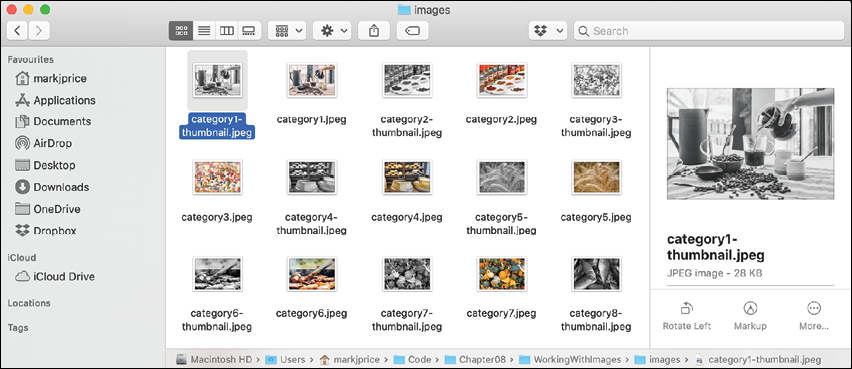
Figure 8.1: Images after processing
ImageSharp also has NuGet packages for programmatically drawing images and working with images on the web, as shown in the following list:
SixLabors.ImageSharp.DrawingSixLabors.ImageSharp.Web
Internationalizing your code
Internationalization is the process of enabling your code to run correctly all over the world. It has two parts: globalization and localization.
Globalization is about writing your code to accommodate multiple languages and region combinations. The combination of a language and a region is known as a culture. It is important for your code to know both the language and region because, for example, the date and currency formats are different in Quebec and Paris, despite them both using the French language.
There are International Organization for Standardization (ISO) codes for all culture combinations. For example, in the code da-DK, da indicates the Danish language and DK indicates the Denmark region, and in the code fr-CA, fr indicates the French language and CA indicates the Canada region.
ISO is not an acronym. ISO is a reference to the Greek word isos (which means equal).
Localization is about customizing the user interface to support a language, for example, changing the label of a button to be Close (en) or Fermer (fr). Since localization is more about the language, it doesn't always need to know about the region, although ironically enough, standardization (en-US) and standardisation (en-GB) suggest otherwise.
Detecting and changing the current culture
Internationalization is a huge topic on which several thousand-page books have been written. In this section, you will get a brief introduction to the basics using the CultureInfo type in the System.Globalization namespace.
Let's write some code:
- Use your preferred code editor to add a new console app named
Internationalizationto theChapter08solution/workspace. - In Visual Studio Code, select
Internationalizationas the active OmniSharp project. - At the top of
Program.cs, import the namespace for using globalization types, as shown in the following code:using System.Globalization; // CultureInfo - Add statements to get the current globalization and localization cultures and output some information about them, and then prompt the user to enter a new culture code and show how that affects the formatting of common values such as dates and currency, as shown in the following code:
CultureInfo globalization = CultureInfo.CurrentCulture;
CultureInfo localization = CultureInfo.CurrentUICulture;
WriteLine("The current globalization culture is {0}: {1}",
  globalization.Name, globalization.DisplayName);
WriteLine("The current localization culture is {0}: {1}",
  localization.Name, localization.DisplayName);
WriteLine();
WriteLine("en-US: English (United States)");
WriteLine("da-DK: Danish (Denmark)");
WriteLine("fr-CA: French (Canada)");
Write("Enter an ISO culture code: ");
string? newCulture = ReadLine();
if (!string.IsNullOrEmpty(newCulture))
{
  CultureInfo ci = new(newCulture);
  // change the current cultures
  CultureInfo.CurrentCulture = ci;
  CultureInfo.CurrentUICulture = ci;
}
WriteLine();
Write("Enter your name: ");
string? name = ReadLine();
Write("Enter your date of birth: ");
string? dob = ReadLine();
Write("Enter your salary: ");
string? salary = ReadLine();
DateTime date = DateTime.Parse(dob);
int minutes = (int)DateTime.Today.Subtract(date).TotalMinutes;
decimal earns = decimal.Parse(salary);
WriteLine(
  "{0} was born on a {1:dddd}, is {2:N0} minutes old, and earns {3:C}",
  name, date, minutes, earns);
When you run an application, it automatically sets its thread to use the culture of the operating system. I am running my code in London, UK, so the thread is set to English (United Kingdom).
The code prompts the user to enter an alternative ISO code. This allows your applications to replace the default culture at runtime.
The application then uses standard format codes to output the day of the week using format code
dddd; the number of minutes with thousand separators using format codeN0; and the salary with the currency symbol. These adapt automatically, based on the thread's culture. - Run the code and enter
en-GBfor the ISO code and then enter some sample data including a date in a format valid for British English, as shown in the following output:Enter an ISO culture code: en-GB Enter your name: Alice Enter your date of birth: 30/3/1967 Enter your salary: 23500 Alice was born on a Thursday, is 25,469,280 minutes old, and earns £23,500.00If you enter
en-USinstead ofen-GB, then you must enter the date using month/day/year. - Rerun the code and try a different culture, such as Danish in Denmark, as shown in the following output:
Enter an ISO culture code: da-DK
Enter your name: Mikkel
Enter your date of birth: 12/3/1980
Enter your salary: 340000
Mikkel was born on a onsdag, is 18.656.640 minutes old, and earns 340.000,00 kr.
In this example, only the date and salary are globalized into Danish. The rest of the text is hardcoded as English. This book does not currently include how to translate text from one language to another. If you would like me to include that in the next edition, please let me know.
Good Practice: Consider whether your application needs to be internationalized and plan for that before you start coding! Write down all the pieces of text in the user interface that will need to be localized. Think about all the data that will need to be globalized (date formats, number formats, and sorting text behavior).
Practicing and exploring
Test your knowledge and understanding by answering some questions, get some hands-on practice, and explore with deeper research into the topics in this chapter.
Exercise 8.1 – Test your knowledge
Use the web to answer the following questions:
- What is the maximum number of characters that can be stored in a
stringvariable? - When and why should you use a
SecureStringtype? - When is it appropriate to use a
StringBuilderclass? - When should you use a
LinkedList<T>class? - When should you use a
SortedDictionary<T>class rather than aSortedList<T>class? - What is the ISO culture code for Welsh?
- What is the difference between localization, globalization, and internationalization?
- In a regular expression, what does
$mean? - In a regular expression, how can you represent digits?
- Why should you not use the official standard for email addresses to create a regular expression to validate a user's email address?
Exercise 8.2 – Practice regular expressions
In the Chapter08 solution/workspace, create a console application named Exercise02 that prompts the user to enter a regular expression and then prompts the user to enter some input and compare the two for a match until the user presses Esc, as shown in the following output:
The default regular expression checks for at least one digit.
Enter a regular expression (or press ENTER to use the default): ^[a-z]+$
Enter some input: apples
apples matches ^[a-z]+$? True
Press ESC to end or any key to try again.
Enter a regular expression (or press ENTER to use the default): ^[a-z]+$
Enter some input: abc123xyz
abc123xyz matches ^[a-z]+$? False
Press ESC to end or any key to try again.
Exercise 8.3 – Practice writing extension methods
In the Chapter08 solution/workspace, create a class library named Exercise03 that defines extension methods that extend number types such as BigInteger and int with a method named ToWords that returns a string describing the number; for example, 18,000,000 would be eighteen million, and 18,456,002,032,011,000,007 would be eighteen quintillion, four hundred and fifty-six quadrillion, two trillion, thirty-two billion, eleven million, and seven.
You can read more about names for large numbers at the following link: https://en.wikipedia.org/wiki/Names_of_large_numbers
Exercise 8.4 – Explore topics
Use the links on the following page to learn more detail about the topics covered in this chapter:
Summary
In this chapter, you explored some choices for types to store and manipulate numbers, dates and times, and text including regular expressions, and which collections to use for storing multiple items; worked with indexes, ranges, and spans; used some network resources; reflected on code and attributes; manipulated images using a Microsoft-recommended third-party library; and learned how to internationalize your code.
In the next chapter, we will manage files and streams, encode and decode text, and perform serialization.