11
Querying and Manipulating Data Using LINQ
This chapter is about Language INtegrated Query (LINQ) expressions. LINQ is a set of language extensions that add the ability to work with sequences of items and then filter, sort, and project them into different outputs.
This chapter will cover the following topics:
- Writing LINQ expressions
- Working with sets using LINQ
- Using LINQ with EF Core
- Sweetening LINQ syntax with syntactic sugar
- Using multiple threads with parallel LINQ
- Creating your own LINQ extension methods
- Working with LINQ to XML
Writing LINQ expressions
Although we wrote a few LINQ expressions in Chapter 10, Working with Data Using Entity Framework Core, they weren't the focus, and so I didn't properly explain how LINQ works, so let's now take time to properly understand them.
What makes LINQ?
LINQ has several parts; some are required, and some are optional:
- Extension methods (required): These include examples such as
Where,OrderBy, andSelect. These are what provide the functionality of LINQ. - LINQ providers (required): These include LINQ to Objects for processing in-memory objects, LINQ to Entities for processing data stored in external databases and modeled with EF Core, and LINQ to XML for processing data stored as XML. These providers are what execute LINQ expressions in a way specific to different types of data.
- Lambda expressions (optional): These can be used instead of named methods to simplify LINQ queries, for example, for the conditional logic of the
Wheremethod for filtering. - LINQ query comprehension syntax (optional): These include C# keywords like
from,in,where,orderby,descending, andselect. These are aliases for some of the LINQ extension methods, and their use can simplify the queries you write, especially if you already have experience with other query languages, such as Structured Query Language (SQL).
When programmers are first introduced to LINQ, they often believe that LINQ query comprehension syntax is LINQ, but ironically, that is one of the parts of LINQ that is optional!
Building LINQ expressions with the Enumerable class
The LINQ extension methods, such as Where and Select, are appended by the Enumerable static class to any type, known as a sequence, that implements IEnumerable<T>.
For example, an array of any type implements the IEnumerable<T> class, where T is the type of item in the array. This means that all arrays support LINQ to query and manipulate them.
All generic collections, such as List<T>, Dictionary<TKey, TValue>, Stack<T>, and Queue<T>, implement IEnumerable<T>, so they can be queried and manipulated with LINQ too.
Enumerable defines more than 50 extension methods, as summarized in the following table:
|
Method(s) |
Description |
|
|
Get the first or last item in the sequence or throw an exception, or return the default value for the type, for example, |
|
|
Return a sequence of items that match a specified filter. |
|
|
Return an item that matches a specific filter or throw an exception, or return the default value for the type if there is not exactly one match. |
|
|
Return an item at a specified index position or throw an exception, or return the default value for the type if there is not an item at that position. New in .NET 6 are overloads that can be passed an |
|
|
Project items into a different shape, that is, a different type, and flatten a nested hierarchy of items. |
|
|
Sort items by a specified field or property. |
|
|
Reverse the order of the items. |
|
|
Group and/or join two sequences. |
|
|
Skip a number of items; or skip while an expression is |
|
|
Take a number of items; or take while an expression is |
|
|
Calculate aggregate values. |
|
|
|
|
|
Return |
|
|
Cast items into a specified type. It is useful to convert non-generic objects to a generic type in scenarios where the compiler would otherwise complain. |
|
|
Remove items that do not match a specified type. |
|
|
Remove duplicate items. |
|
|
Perform operations that return sets. Sets cannot have duplicate items. Although the inputs can be any sequence and so the inputs can have duplicates, the result is always a set. |
|
|
Divide a sequence into sized batches. |
|
|
Perform sequence-combining operations. |
|
|
Perform a match operation on two sequences based on the position of items, for example, the item at position 1 in the first sequence matches the item at position 1 in the second sequence. New in .NET 6 is a match operation on three sequences. Previously you would have had to run the two sequences overload twice to achieve the same goal. |
|
|
Convert the sequence into an array or collection. These are the only extension methods that execute the LINQ expression. |
|
|
New in .NET 6 are the |
The Enumerable class also has some methods that are not extension methods, as shown in the following table:
|
Method |
Description |
|
|
Returns an empty sequence of the specified type |
|
|
Returns a sequence of integers from the |
|
|
Returns a sequence that contains the same |
Understanding deferred execution
LINQ uses deferred execution. It is important to understand that calling most of these extension methods does not execute the query and get the results. Most of these extension methods return a LINQ expression that represents a question, not an answer. Let's explore:
- Use your preferred code editor to create a new solution/workspace named
Chapter11. - Add a console app project, as defined in the following list:
- Project template: Console Application /
console - Workspace/solution file and folder:
Chapter11 - Project file and folder:
LinqWithObjects
- Project template: Console Application /
- In
Program.cs, delete the existing code and statically importConsole. - Add statements to define a sequence of
stringvalues for people who work in an office, as shown in the following code:// a string array is a sequence that implements IEnumerable<string> string[] names = new[] { "Michael", "Pam", "Jim", "Dwight", "Angela", "Kevin", "Toby", "Creed" }; WriteLine("Deferred execution"); // Question: Which names end with an M? // (written using a LINQ extension method) var query1 = names.Where(name => name.EndsWith("m")); // Question: Which names end with an M? // (written using LINQ query comprehension syntax) var query2 = from name in names where name.EndsWith("m") select name; - To ask the question and get the answer, i.e. execute the query, you must materialize it by either calling one of the "To" methods like
ToArrayorToLookupor by enumerating the query, as shown in the following code:// Answer returned as an array of strings containing Pam and Jim string[] result1 = query1.ToArray(); // Answer returned as a list of strings containing Pam and Jim List<string> result2 = query2.ToList(); // Answer returned as we enumerate over the results foreach (string name in query1) { WriteLine(name); // outputs Pam names[2] = "Jimmy"; // change Jim to Jimmy // on the second iteration Jimmy does not end with an M } - Run the console app and note the result, as shown in the following output:
Deferred execution
Pam
Due to deferred execution, after outputting the first result, Pam, if the original array values change, then by the time we loop back around, there are no more matches because Jim has become Jimmy and does not end with an M, so only Pam is outputted.
Before we get too deep into the weeds, let's slow down and look at some common LINQ extension methods and how to use them, one at a time.
Filtering entities with Where
The most common reason for using LINQ is to filter items in a sequence using the Where extension method. Let's explore filtering by defining a sequence of names and then applying LINQ operations to it:
- In the project file, comment out the element that enables implicit usings, as shown highlighted in the following markup:
<Project Sdk="Microsoft.NET.Sdk"> <PropertyGroup> <OutputType>Exe</OutputType> <TargetFramework>net6.0</TargetFramework> <Nullable>enable</Nullable> <!--<ImplicitUsings>enable</ImplicitUsings>--> </PropertyGroup> </Project> - In
Program.cs, attempt to call theWhereextension method on the array of names, as shown in the following code:WriteLine("Writing queries"); var query = names.W - As you try to type the
Wheremethod, note that it is missing from the IntelliSense list of members of a string array, as shown in Figure 11.1: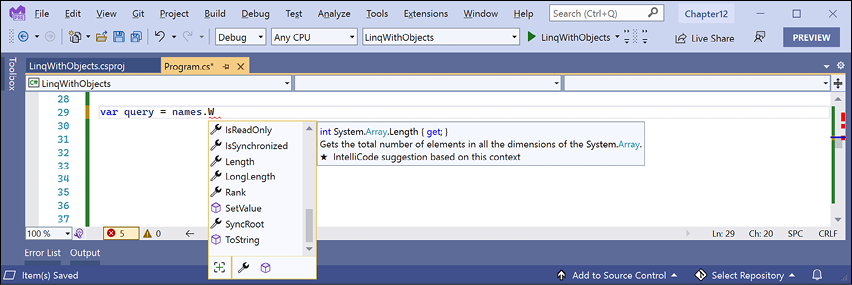
Figure 11.1: IntelliSense with the Where extension method missing
This is because
Whereis an extension method. It does not exist on the array type. To make theWhereextension method available, we must import theSystem.Linqnamespace. This is implicitly imported by default in new .NET 6 projects, but we disabled it. - In the project file, uncomment out the element that enables implicit usings.
- Retype the
Wheremethod and note that the IntelliSense list now includes the extension methods added by theEnumerableclass, as shown in Figure 11.2: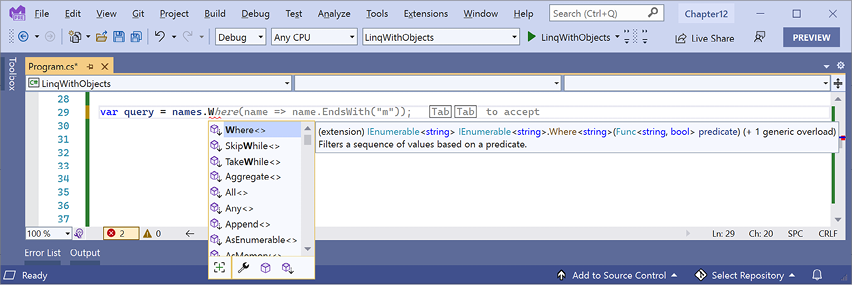
Figure 11.2: IntelliSense showing LINQ Enumerable extension methods now
- As you type the parentheses for the
Wheremethod, IntelliSense tells us that to callWhere, we must pass in an instance of aFunc<string, bool>delegate. - Enter an expression to create a new instance of a
Func<string, bool>delegate, and for now note that we have not yet supplied a method name because we will define it in the next step, as shown in the following code:var query = names.Where(new Func<string, bool>( ))
The Func<string, bool> delegate tells us that for each string variable passed to the method, the method must return a bool value. If the method returns true, it indicates that we should include the string in the results, and if the method returns false, it indicates that we should exclude it.
Targeting a named method
Let's define a method that only includes names that are longer than four characters:
- At the bottom of
Program.cs, define a method that will include only names longer than four characters, as shown in the following code:static bool NameLongerThanFour(string name) { return name.Length > 4; } - Above the
NameLongerThanFourmethod, pass the method's name into theFunc<string, bool>delegate, and then loop through the query items, as shown highlighted in the following code:var query = names.Where( new Func<string, bool>(NameLongerThanFour)); foreach (string item in query) { WriteLine(item); } - Run the code and view the results, noting that only names longer than four letters are listed, as shown in the following output:
Writing queries
Michael
Dwight
Angela
Kevin
Creed
Simplifying the code by removing the explicit delegate instantiation
We can simplify the code by deleting the explicit instantiation of the Func<string, bool> delegate because the C# compiler can instantiate the delegate for us:
- To help you learn by seeing progressively improved code, copy and paste the query
- Comment out the first example, as shown in the following code:
// var query = names.Where( // new Func<string, bool>(NameLongerThanFour)); - Modify the copy to remove the explicit instantiation of the delegate, as shown in the following code:
var query = names.Where(NameLongerThanFour); - Run the code and note that it has the same behavior.
Targeting a lambda expression
We can simplify our code even further using a lambda expression in place of a named method.
Although it can look complicated at first, a lambda expression is simply a nameless function. It uses the => (read as "goes to") symbol to indicate the return value:
- Copy and paste the query, comment the second example, and modify the query, as shown in the following code:
var query = names.Where(name => name.Length > 4);Note that the syntax for a lambda expression includes all the important parts of the
NameLongerThanFourmethod, but nothing more. A lambda expression only needs to define the following:- The names of input parameters:
name - A return value expression:
name.Length > 4
The type of the
nameinput parameter is inferred from the fact that the sequence containsstringvalues, and the return type must be aboolvalue as defined by the delegate forWhereto work, so the expression after the=>symbol must return aboolvalue.The compiler does most of the work for us, so our code can be as concise as possible.
- The names of input parameters:
- Run the code and note that it has the same behavior.
Sorting entities
Other commonly used extension methods are OrderBy and ThenBy, used for sorting a sequence.
Extension methods can be chained if the previous method returns another sequence, that is, a type that implements the IEnumerable<T> interface.
Sorting by a single property using OrderBy
Let's continue working with the current project to explore sorting:
- Append a call to
OrderByto the end of the existing query, as shown in the following code:var query = names .Where(name => name.Length > 4) .OrderBy(name => name.Length);Good Practice: Format the LINQ statement so that each extension method call happens on its own line to make them easier to read.
- Run the code and note that the names are now sorted by shortest first, as shown in the following output:
Kevin
Creed
Dwight
Angela
Michael
To put the longest name first, you would use OrderByDescending.
Sorting by a subsequent property using ThenBy
We might want to sort by more than one property, for example, to sort names of the same length in alphabetical order:
- Add a call to the
ThenBymethod at the end of the existing query, as shown highlighted in the following code:var query = names .Where(name => name.Length > 4) .OrderBy(name => name.Length) .ThenBy(name => name); - Run the code and note the slight difference in the following sort order. Within a group of names of the same length, the names are sorted alphabetically by the full value of the
string, soCreedcomes beforeKevin, andAngelacomes beforeDwight, as shown in the following output:Creed Kevin Angela Dwight Michael
Declaring a query using var or a specified type
While writing a LINQ expression it is convenient to use var to declare the query object. This is because the type frequently changes as you work on the LINQ expression. For example, our query started as an IEnumerable<string> and is currently an IOrderedEnumerable<string>:
- Hover your mouse over the
varkeyword and note that its type isIOrderedEnumerable<string> - Replace
varwith the actual type, as shown highlighted in the following code:IOrderedEnumerable<string> query = names .Where(name => name.Length > 4) .OrderBy(name => name.Length) .ThenBy(name => name);
Good Practice: Once you have finished working on a query, you could change the declared type from var to the actual type to make it clearer what the type is. This is easy because your code editor can tell you what it is.
Filtering by type
The Where extension method is great for filtering by values, such as text and numbers. But what if the sequence contains multiple types, and you want to filter by a specific type and respect any inheritance hierarchy?
Imagine that you have a sequence of exceptions. There are hundreds of exception types that form a complex hierarchy, as partially shown in Figure 11.3:
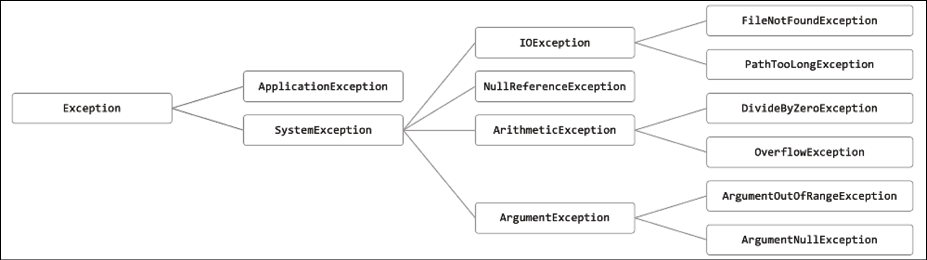
Figure 11.3: A partial exception inheritance hierarchy
Let's explore filtering by type:
- In
Program.cs, define a list of exception-derived objects, as shown in the following code:WriteLine("Filtering by type"); List<Exception> exceptions = new() { new ArgumentException(), new SystemException(), new IndexOutOfRangeException(), new InvalidOperationException(), new NullReferenceException(), new InvalidCastException(), new OverflowException(), new DivideByZeroException(), new ApplicationException() }; - Write statements using the
OfType<T>extension method to remove exceptions that are not arithmetic exceptions and write only the arithmetic exceptions to the console, as shown in the following code:IEnumerable<ArithmeticException> arithmeticExceptionsQuery = exceptions.OfType<ArithmeticException>(); foreach (ArithmeticException exception in arithmeticExceptionsQuery) { WriteLine(exception); } - Run the code and note that the results only include exceptions of the
ArithmeticExceptiontype, or theArithmeticException-derived types, as shown in the following output:System.OverflowException: Arithmetic operation resulted in an overflow. System.DivideByZeroException: Attempted to divide by zero.
Working with sets and bags using LINQ
Sets are one of the most fundamental concepts in mathematics. A set is a collection of one or more unique objects. A multiset, aka bag, is a collection of one or more objects that can have duplicates.
You might remember being taught about Venn diagrams in school. Common set operations include the intersect or union between sets.
Let's create a console application that will define three arrays of string values for cohorts of apprentices and then perform some common set and multiset operations on them:
- Use your preferred code editor to add a new console app named
LinqWithSetsto theChapter11solution/workspace:- In Visual Studio, set the startup project for the solution to the current selection.
- In Visual Studio Code, select
LinqWithSetsas the active OmniSharp project.
- In
Program.cs, delete the existing code and statically import theConsoletype, as shown in the following code:using static System.Console; - At the bottom of
Program.cs, add the following method that outputs any sequence ofstringvariables as a comma-separated singlestringto the console output, along with an optional description, as shown in the following code:static void Output(IEnumerable<string> cohort, string description = "") { if (!string.IsNullOrEmpty(description)) { WriteLine(description); } Write(" "); WriteLine(string.Join(", ", cohort.ToArray())); WriteLine(); } - Above the
Outputmethod, add statements to define three arrays of names, output them, and then perform various set operations on them, as shown in the following code:string[] cohort1 = new[] { "Rachel", "Gareth", "Jonathan", "George" }; string[] cohort2 = new[] { "Jack", "Stephen", "Daniel", "Jack", "Jared" }; string[] cohort3 = new[] { "Declan", "Jack", "Jack", "Jasmine", "Conor" }; Output(cohort1, "Cohort 1"); Output(cohort2, "Cohort 2"); Output(cohort3, "Cohort 3"); Output(cohort2.Distinct(), "cohort2.Distinct()"); Output(cohort2.DistinctBy(name => name.Substring(0, 2)), "cohort2.DistinctBy(name => name.Substring(0, 2)):"); Output(cohort2.Union(cohort3), "cohort2.Union(cohort3)"); Output(cohort2.Concat(cohort3), "cohort2.Concat(cohort3)"); Output(cohort2.Intersect(cohort3), "cohort2.Intersect(cohort3)"); Output(cohort2.Except(cohort3), "cohort2.Except(cohort3)"); Output(cohort1.Zip(cohort2,(c1, c2) => $"{c1} matched with {c2}"), "cohort1.Zip(cohort2)"); - Run the code and view the results, as shown in the following output:
Cohort 1 Rachel, Gareth, Jonathan, George Cohort 2 Jack, Stephen, Daniel, Jack, Jared Cohort 3 Declan, Jack, Jack, Jasmine, Conor cohort2.Distinct() Jack, Stephen, Daniel, Jared cohort2.DistinctBy(name => name.Substring(0, 2)): Jack, Stephen, Daniel cohort2.Union(cohort3) Jack, Stephen, Daniel, Jared, Declan, Jasmine, Conor cohort2.Concat(cohort3) Jack, Stephen, Daniel, Jack, Jared, Declan, Jack, Jack, Jasmine, Conor cohort2.Intersect(cohort3) Jack cohort2.Except(cohort3) Stephen, Daniel, Jared cohort1.Zip(cohort2) Rachel matched with Jack, Gareth matched with Stephen, Jonathan matched with Daniel, George matched with Jack
With Zip, if there are unequal numbers of items in the two sequences, then some items will not have a matching partner. Those without a partner, like Jared, will not be included in the result.
For the DistinctBy example, instead of removing duplicates by comparing the whole name, we define a lambda key selector to remove duplicates by comparing the first two characters, so Jared is removed because Jack already is a name that starts with Ja.
So far, we have used the LINQ to Objects provider to work with in-memory objects. Next, we will use the LINQ to Entities provider to work with entities stored in a database.
Using LINQ with EF Core
We have looked at LINQ queries that filter and sort, but none that change the shape of the items in the sequence. This is called projection because it's about projecting items of one shape into another shape. To learn about projection, it is best to have some more complex types to work with, so in the next project, instead of using string sequences, we will use sequences of entities from the Northwind sample database.
I will give instructions to use SQLite because it is cross-platform but if you prefer to use SQL Server then feel free to do so. I have included some commented code to enable SQL Server if you choose.
Building an EF Core model
We must define an EF Core model to represent the database and tables that we will work with. We will define the model manually to take complete control and to prevent a relationship from being automatically defined between the Categories and Products tables. Later, you will use LINQ to join the two entity sets:
- Use your preferred code editor to add a new console app named
LinqWithEFCoreto theChapter11solution/workspace. - In Visual Studio Code, select
LinqWithEFCoreas the active OmniSharp project. - In the
LinqWithEFCoreproject, add a package reference to the EF Core provider for SQLite and/or SQL Server, as shown in the following markup:<ItemGroup> <PackageReference Include="Microsoft.EntityFrameworkCore.Sqlite" Version="6.0.0" /> <PackageReference Include="Microsoft.EntityFrameworkCore.SqlServer" Version="6.0.0" /> </ItemGroup> - Build the project to restore packages.
- Copy the
Northwind4Sqlite.sqlfile into theLinqWithEFCorefolder. - At a command prompt or terminal, create the Northwind database by executing the following command:
sqlite3 Northwind.db -init Northwind4Sqlite.sql - Be patient because this command might take a while to create the database structure. Eventually you will see the SQLite command prompt, as shown in the following output:
-- Loading resources from Northwind.sql SQLite version 3.36.0 2021-08-02 15:20:15 Enter ".help" for usage hints. sqlite> - Press cmd + D on macOS or Ctrl + C on Windows to exit SQLite command mode.
- Add three class files to the project, named
Northwind.cs,Category.cs, andProduct.cs. - Modify the class file named
Northwind.cs, as shown in the following code:using Microsoft.EntityFrameworkCore; // DbContext, DbSet<T> namespace Packt.Shared; // this manages the connection to the database public class Northwind : DbContext { // these properties map to tables in the database public DbSet<Category>? Categories { get; set; } public DbSet<Product>? Products { get; set; } protected override void OnConfiguring( DbContextOptionsBuilder optionsBuilder) { string path = Path.Combine( Environment.CurrentDirectory, "Northwind.db"); optionsBuilder.UseSqlite($"Filename={path}"); /* string connection = "Data Source=.;" + "Initial Catalog=Northwind;" + "Integrated Security=true;" + "MultipleActiveResultSets=true;"; optionsBuilder.UseSqlServer(connection); */ } protected override void OnModelCreating( ModelBuilder modelBuilder) { modelBuilder.Entity<Product>() .Property(product => product.UnitPrice) .HasConversion<double>(); } } - Modify the class file named
Category.cs, as shown in the following code:using System.ComponentModel.DataAnnotations; namespace Packt.Shared; public class Category { public int CategoryId { get; set; } [Required] [StringLength(15)] public string CategoryName { get; set; } = null!; public string? Description { get; set; } } - Modify the class file named
Product.cs, as shown in the following code:using System.ComponentModel.DataAnnotations; using System.ComponentModel.DataAnnotations.Schema; namespace Packt.Shared; public class Product { public int ProductId { get; set; } [Required] [StringLength(40)] public string ProductName { get; set; } = null!; public int? SupplierId { get; set; } public int? CategoryId { get; set; } [StringLength(20)] public string? QuantityPerUnit { get; set; } [Column(TypeName = "money")] // required for SQL Server provider public decimal? UnitPrice { get; set; } public short? UnitsInStock { get; set; } public short? UnitsOnOrder { get; set; } public short? ReorderLevel { get; set; } public bool Discontinued { get; set; } } - Build the project and fix any compiler errors.
If you are using Visual Studio 2022 for Windows, then the compiled application executes in the
LinqWithEFCore\bin\Debug\net6.0folder so it will not find the database file unless we indicate that it should always be copied to the output directory. - In Solution Explorer, right-click the
Northwind.dbfile and select Properties. - In Properties, set Copy to Output Directory to Copy always.
Filtering and sorting sequences
Now let's write statements to filter and sort sequences of rows from the tables:
- In
Program.cs, statically import theConsoletype and namespaces for working with EF Core and your entity model using LINQ, as shown in the following code:using Packt.Shared; // Northwind, Category, Product using Microsoft.EntityFrameworkCore; // DbSet<T> using static System.Console; - At the bottom of
Program.cs, write a method to filter and sort products, as shown in the following code:static void FilterAndSort() { using (Northwind db = new()) { DbSet<Product> allProducts = db.Products; IQueryable<Product> filteredProducts = allProducts.Where(product => product.UnitPrice < 10M); IOrderedQueryable<Product> sortedAndFilteredProducts = filteredProducts.OrderByDescending(product => product.UnitPrice); WriteLine("Products that cost less than $10:"); foreach (Product p in sortedAndFilteredProducts) { WriteLine("{0}: {1} costs {2:$#,##0.00}", p.ProductId, p.ProductName, p.UnitPrice); } WriteLine(); } }DbSet<T>implementsIEnumerable<T>, so LINQ can be used to query and manipulate collections of entities in models built for EF Core. (Actually, I should sayTEntityinstead ofTbut the name of this generic type has no functional effect. The only requirement is that the type is aclass. The name just indicates the class is expected to be an entity model.)You might have also noticed that the sequences implement
IQueryable<T>(orIOrderedQueryable<T>after a call to an ordering LINQ method) instead ofIEnumerable<T>orIOrderedEnumerable<T>.This is an indication that we are using a LINQ provider that builds the query in memory using expression trees. They represent code in a tree-like data structure and enable the creation of dynamic queries, which is useful for building LINQ queries for external data providers like SQLite.
The LINQ expression will be converted into another query language, such as SQL. Enumerating the query with
foreachor calling a method such asToArraywill force the execution of the query and materialize the results. - After the namespace imports in
Program.cs, call theFilterAndSortmethod. - Run the code and view the result, as shown in the following output:
Products that cost less than $10: 41: Jack's New England Clam Chowder costs $9.65 45: Rogede sild costs $9.50 47: Zaanse koeken costs $9.50 19: Teatime Chocolate Biscuits costs $9.20 23: Tunnbröd costs $9.00 75: Rhönbräu Klosterbier costs $7.75 54: Tourtière costs $7.45 52: Filo Mix costs $7.00 13: Konbu costs $6.00 24: Guaraná Fantástica costs $4.50 33: Geitost costs $2.50
Although this query outputs the information we want, it does so inefficiently because it gets all columns from the Products table instead of just the three columns we need, which is the equivalent of the following SQL statement:
SELECT * FROM Products;
In Chapter 10, Working with Data Using Entity Framework Core, you learned how to log the SQL commands executed against SQLite so that you could see this for yourself.
Projecting sequences into new types
Before we look at projection, we need to review object initialization syntax. If you have a class defined, then you can instantiate an object using the class name, new(), and curly braces to set initial values for fields and properties, as shown in the following code:
public class Person
{
public string Name { get; set; }
public DateTime DateOfBirth { get; set; }
}
Person knownTypeObject = new()
{
Name = "Boris Johnson",
DateOfBirth = new(year: 1964, month: 6, day: 19)
};
C# 3.0 and later allow instances of anonymous types to be instantiated using the var keyword, as shown in the following code:
var anonymouslyTypedObject = new
{
Name = "Boris Johnson",
DateOfBirth = new DateTime(year: 1964, month: 6, day: 19)
};
Although we did not specify a type, the compiler can infer an anonymous type from the setting of two properties named Name and DateOfBirth. The compiler can infer the types of the two properties from the values assigned: a literal string and a new instance of a date/time value.
This capability is especially useful when writing LINQ queries to project an existing type into a new type without having to explicitly define the new type. Since the type is anonymous, this can only work with var-declared local variables.
Let's make the SQL command executed against the database table more efficient by adding a call to the Select method to project instances of the Product class into instances of a new anonymous type with only three properties:
- In
FilterAndSort, add a statement to extend the LINQ query to use theSelectmethod to return only the three properties (that is, table columns) that we need, and modify theforeachstatement to use thevarkeyword and the projection LINQ expression, as shown highlighted in the following code:IOrderedQueryable<Product> sortedAndFilteredProducts = filteredProducts.OrderByDescending(product => product.UnitPrice); var projectedProducts = sortedAndFilteredProducts .Select(product => new // anonymous type { product.ProductId, product.ProductName, product.UnitPrice }); WriteLine("Products that cost less than $10:"); foreach (var p in projectedProducts) { - Hover your mouse over the
newkeyword in theSelectmethod call and thevarkeyword in theforeachstatement and note that it is an anonymous type, as shown in Figure 11.4: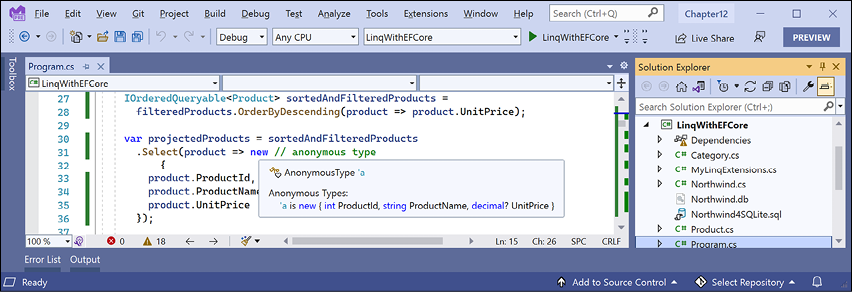
Figure 11.4: An anonymous type used during LINQ projection
- Run the code and confirm that the output is the same as before.
Joining and grouping sequences
There are two extension methods for joining and grouping:
- Join: This method has four parameters: the sequence that you want to join with, the property or properties on the left sequence to match on, the property or properties on the right sequence to match on, and a projection.
- GroupJoin: This method has the same parameters, but it combines the matches into a group object with a
Keyproperty for the matching value and anIEnumerable<T>type for the multiple matches.
Joining sequences
Let's explore these methods when working with two tables: Categories and Products:
- At the bottom of
Program.cs, create a method to select categories and products, join them, and output them, as shown in the following code:static void JoinCategoriesAndProducts() { using (Northwind db = new()) { // join every product to its category to return 77 matches var queryJoin = db.Categories.Join( inner: db.Products, outerKeySelector: category => category.CategoryId, innerKeySelector: product => product.CategoryId, resultSelector: (c, p) => new { c.CategoryName, p.ProductName, p.ProductId }); foreach (var item in queryJoin) { WriteLine("{0}: {1} is in {2}.", arg0: item.ProductId, arg1: item.ProductName, arg2: item.CategoryName); } } }In a join, there are two sequences, outer and inner. In the previous example,
categoriesis the outer sequence andproductsis the inner sequence. - At the top of
Program.cs, comment out the call toFilterAndSortand callJoinCategoriesAndProducts. - Run the code and view the results. Note that there is a single line of output for each of the 77 products, as shown in the following output (edited to only include the first 10 items):
1: Chai is in Beverages. 2: Chang is in Beverages. 3: Aniseed Syrup is in Condiments. 4: Chef Anton's Cajun Seasoning is in Condiments. 5: Chef Anton's Gumbo Mix is in Condiments. 6: Grandma's Boysenberry Spread is in Condiments. 7: Uncle Bob's Organic Dried Pears is in Produce. 8: Northwoods Cranberry Sauce is in Condiments. 9: Mishi Kobe Niku is in Meat/Poultry. 10: Ikura is in Seafood. ... - At the end of the existing query, call the
OrderBymethod to sort byCategoryName, as shown in the following code:.OrderBy(cp => cp.CategoryName); - Run the code and view the results. Note that there is a single line of output for each of the 77 products, and the results show all products in the
Beveragescategory first, then theCondimentscategory, and so on, as shown in the following partial output:1: Chai is in Beverages. 2: Chang is in Beverages. 24: Guaraná Fantástica is in Beverages. 34: Sasquatch Ale is in Beverages. 35: Steeleye Stout is in Beverages. 38: Côte de Blaye is in Beverages. 39: Chartreuse verte is in Beverages. 43: Ipoh Coffee is in Beverages. 67: Laughing Lumberjack Lager is in Beverages. 70: Outback Lager is in Beverages. 75: Rhönbräu Klosterbier is in Beverages. 76: Lakkalikööri is in Beverages. 3: Aniseed Syrup is in Condiments. 4: Chef Anton's Cajun Seasoning is in Condiments. ...
Group-joining sequences
- At the bottom of
Program.cs, create a method to group and join, show the group name, and then show all the items within each group, as shown in the following code:static void GroupJoinCategoriesAndProducts() { using (Northwind db = new()) { // group all products by their category to return 8 matches var queryGroup = db.Categories.AsEnumerable().GroupJoin( inner: db.Products, outerKeySelector: category => category.CategoryId, innerKeySelector: product => product.CategoryId, resultSelector: (c, matchingProducts) => new { c.CategoryName, Products = matchingProducts.OrderBy(p => p.ProductName) }); foreach (var category in queryGroup) { WriteLine("{0} has {1} products.", arg0: category.CategoryName, arg1: category.Products.Count()); foreach (var product in category.Products) { WriteLine($" {product.ProductName}"); } } } }If we had not called the
AsEnumerablemethod, then a runtime exception would have been thrown, as shown in the following output:Unhandled exception. System.ArgumentException: Argument type 'System.Linq.IOrderedQueryable`1[Packt.Shared.Product]' does not match the corresponding member type 'System.Linq.IOrderedEnumerable`1[Packt.Shared.Product]' (Parameter 'arguments[1]')This is because not all LINQ extension methods can be converted from expression trees into some other query syntax like SQL. In these cases, we can convert from
IQueryable<T>toIEnumerable<T>by calling theAsEnumerablemethod, which forces query processing to use LINQ to EF Core only to bring the data into the application and then use LINQ to Objects to execute more complex processing in memory. But, often, this is less efficient. - At the top of
Program.cs, comment out the previous method call and callGroupJoinCategoriesAndProducts. - Run the code, view the results, and note that the products inside each category have been sorted by their name, as defined in the query and as shown in the following partial output:
Beverages has 12 products. Chai Chang Chartreuse verte Côte de Blaye Guaraná Fantástica Ipoh Coffee Lakkalikööri Laughing Lumberjack Lager Outback Lager Rhönbräu Klosterbier Sasquatch Ale Steeleye Stout Condiments has 12 products. Aniseed Syrup Chef Anton's Cajun Seasoning Chef Anton's Gumbo Mix ...
Aggregating sequences
There are LINQ extension methods to perform aggregation functions, such as Average and Sum. Let's write some code to see some of these methods in action aggregating information from the Products table:
- At the bottom of
Program.cs, create a method to show the use of the aggregation extension methods, as shown in the following code:static void AggregateProducts() { using (Northwind db = new()) { WriteLine("{0,-25} {1,10}", arg0: "Product count:", arg1: db.Products.Count()); WriteLine("{0,-25} {1,10:$#,##0.00}", arg0: "Highest product price:", arg1: db.Products.Max(p => p.UnitPrice)); WriteLine("{0,-25} {1,10:N0}", arg0: "Sum of units in stock:", arg1: db.Products.Sum(p => p.UnitsInStock)); WriteLine("{0,-25} {1,10:N0}", arg0: "Sum of units on order:", arg1: db.Products.Sum(p => p.UnitsOnOrder)); WriteLine("{0,-25} {1,10:$#,##0.00}", arg0: "Average unit price:", arg1: db.Products.Average(p => p.UnitPrice)); WriteLine("{0,-25} {1,10:$#,##0.00}", arg0: "Value of units in stock:", arg1: db.Products .Sum(p => p.UnitPrice * p.UnitsInStock)); } } - At the top of
Program.cs, comment out the previous method and callAggregateProducts - Run the code and view the result, as shown in the following output:
Product count: 77 Highest product price: $263.50 Sum of units in stock: 3,119 Sum of units on order: 780 Average unit price: $28.87 Value of units in stock: $74,050.85
Sweetening LINQ syntax with syntactic sugar
C# 3.0 introduced some new language keywords in 2008 to make it easier for programmers with experience with SQL to write LINQ queries. This syntactic sugar is sometimes called the LINQ query comprehension syntax.
Consider the following array of string values:
string[] names = new[] { "Michael", "Pam", "Jim", "Dwight",
"Angela", "Kevin", "Toby", "Creed" };
To filter and sort the names, you could use extension methods and lambda expressions, as shown in the following code:
var query = names
  .Where(name => name.Length > 4)
  .OrderBy(name => name.Length)
  .ThenBy(name => name);
Or you could achieve the same results by using query comprehension syntax, as shown in the following code:
var query = from name in names
  where name.Length > 4
  orderby name.Length, name
  select name;
The compiler changes the query comprehension syntax to the equivalent extension methods and lambda expressions for you.
The select keyword is always required for LINQ query comprehension syntax. The Select extension method is optional when using extension methods and lambda expressions because if you do not call Select, then the whole item is implicitly selected.
Not all extension methods have a C# keyword equivalent, for example, the Skip and Take extension methods, which are commonly used to implement paging for lots of data.
A query that skips and takes cannot be written using only the query comprehension syntax, so we could write the query using all extension methods, as shown in the following code:
var query = names
  .Where(name => name.Length > 4)
  .Skip(80)
  .Take(10);
Or you can wrap query comprehension syntax in parentheses and then switch to using extension methods, as shown in the following code:
var query = (from name in names
  where name.Length > 4
  select name)
  .Skip(80)
  .Take(10);
Good Practice: Learn both extension methods with lambda expressions and the query comprehension syntax ways of writing LINQ queries, because you are likely to have to maintain code that uses both.
Using multiple threads with parallel LINQ
By default, only one thread is used to execute a LINQ query. Parallel LINQ (PLINQ) is an easy way to enable multiple threads to execute a LINQ query.
Good Practice: Do not assume that using parallel threads will improve the performance of your applications. Always measure real-world timings and resource usage.
Creating an app that benefits from multiple threads
To see it in action, we will start with some code that only uses a single thread to calculate Fibonacci numbers for 45 integers. We will use the StopWatch type to measure the change in performance.
We will use operating system tools to monitor the CPU and CPU core usage. If you do not have multiple CPUs or at least multiple cores, then this exercise won't show much!
- Use your preferred code editor to add a new console app named
LinqInParallelto theChapter11solution/workspace. - In Visual Studio Code, select
LinqInParallelas the active OmniSharp project. - In
Program.cs, delete the existing statements and then import theSystem.Diagnosticsnamespace so that we can use theStopWatchtype, and statically import theSystem.Consoletype. - Add statements to create a stopwatch to record timings, wait for a keypress before starting the timer, create 45 integers, calculate the last Fibonacci number for each of them, stop the timer, and display the elapsed milliseconds, as shown in the following code:
Stopwatch watch = new(); Write("Press ENTER to start. "); ReadLine(); watch.Start(); int max = 45; IEnumerable<int> numbers = Enumerable.Range(start: 1, count: max); WriteLine($"Calculating Fibonacci sequence up to {max}. Please wait..."); int[] fibonacciNumbers = numbers .Select(number => Fibonacci(number)).ToArray(); watch.Stop(); WriteLine("{0:#,##0} elapsed milliseconds.", arg0: watch.ElapsedMilliseconds); Write("Results:"); foreach (int number in fibonacciNumbers) { Write($" {number}"); } static int Fibonacci(int term) => term switch { 1 => 0, 2 => 1, _ => Fibonacci(term - 1) + Fibonacci(term - 2) }; - Run the code, but do not press Enter to start the stopwatch yet because we need to make sure a monitoring tool is showing processor activity.
Using Windows
- If you are using Windows, then right-click on the Windows Start button or press Ctrl + Alt + Delete, and then click on Task Manager.
- At the bottom of the Task Manager window, click More details.
- At the top of the Task Manager window, click on the Performance tab.
- Right-click on the CPU Utilization graph, select Change graph to, and then select Logical processors.
Using macOS
- If you are using macOS, then launch Activity Monitor.
- Navigate to View | Update Frequency Very often (1 sec).
- To see the CPU graphs, navigate to Window | CPU History.
For all operating systems
- Rearrange your monitoring tool and your code editor so that they are side by side.
- Wait for the CPUs to settle and then press Enter to start the stopwatch and run the query. The result should be a number of elapsed milliseconds, as shown in the following output:
Press ENTER to start.
Calculating Fibonacci sequence up to 45. Please wait...
17,624 elapsed milliseconds.
Results: 0 1 1 2 3 5 8 13 21 34 55 89 144 233 377 610 987 1597 2584 4181 6765 10946 17711 28657 46368 75025 121393 196418 317811 514229 832040 1346269 2178309 3524578 5702887 9227465 14930352 24157817 39088169 63245986 102334155 165580141 267914296 433494437 701408733
The monitoring tool will probably show that one or two CPUs were used the most, alternating over time. Others may execute background tasks at the same time, such as the garbage collector, so the other CPUs or cores won't be completely flat, but the work is certainly not being evenly spread among all the possible CPUs or cores. Also, note that some of the logical processors are maxing out at 100%.
- In
Program.cs, modify the query to make a call to theAsParallelextension method and to sort the resulting sequence because when processing in parallel the results can become misordered, as shown highlighted in the following code:int[] fibonacciNumbers = numbers.AsParallel() .Select(number => Fibonacci(number)) .OrderBy(number => number) .ToArray();Good Practice: Never call
AsParallelat the end of a query. This does nothing. You must perform at least one operation after the call toAsParallelfor that operation to be parallelized. .NET 6 introduces a code analyzer that will warn about this type of misuse. - Run the code, wait for CPU charts in your monitoring tool to settle, and then press Enter to start the stopwatch and run the query. This time, the application should complete in less time (although it might not be as less as you might hope for—managing those multiple threads takes extra effort!):
Press ENTER to start. Calculating Fibonacci sequence up to 45. Please wait... 9,028 elapsed milliseconds. Results: 0 1 1 2 3 5 8 13 21 34 55 89 144 233 377 610 987 1597 2584 4181 6765 10946 17711 28657 46368 75025 121393 196418 317811 514229 832040 1346269 2178309 3524578 5702887 9227465 14930352 24157817 39088169 63245986 102334155 165580141 267914296 433494437 701408733 - The monitoring tool should show that all CPUs were used equally to execute the LINQ query, and note that none of the logical processors max out at 100% because the work is more evenly spread.
You will learn more about managing multiple threads in Chapter 12, Improving Performance and Scalability Using Multitasking.
Creating your own LINQ extension methods
In Chapter 6, Implementing Interfaces and Inheriting Classes, you learned how to create your own extension methods. To create LINQ extension methods, all you must do is extend the IEnumerable<T> type.
Good Practice: Put your own extension methods in a separate class library so that they can be easily deployed as their own assembly or NuGet package.
We will improve the Average extension method as an example. A well-educated school child will tell you that average can mean one of three things:
- Mean: Sum the numbers and divide by the count.
- Mode: The most common number.
- Median: The number in the middle of the numbers when ordered.
Microsoft's implementation of the Average extension method calculates the mean. We might want to define our own extension methods for Mode and Median:
- In the
LinqWithEFCoreproject, add a new class file namedMyLinqExtensions.cs. - Modify the class, as shown in the following code:
namespace System.Linq; // extend Microsoft's namespace
public static class MyLinqExtensions
{
  // this is a chainable LINQ extension method
  public static IEnumerable<T> ProcessSequence<T>(
    this IEnumerable<T> sequence)
  {
    // you could do some processing here
    return sequence;
  }
  public static IQueryable<T> ProcessSequence<T>(
    this IQueryable<T> sequence)
  {
    // you could do some processing here
    return sequence;
  }
  // these are scalar LINQ extension methods
  public static int? Median(
    this IEnumerable<int?> sequence)
  {
    var ordered = sequence.OrderBy(item => item);
    int middlePosition = ordered.Count() / 2;
    return ordered.ElementAt(middlePosition);
  }
  public static int? Median<T>(
    this IEnumerable<T> sequence, Func<T, int?> selector)
  {
    return sequence.Select(selector).Median();
  }
  public static decimal? Median(
    this IEnumerable<decimal?> sequence)
  {
    var ordered = sequence.OrderBy(item => item);
    int middlePosition = ordered.Count() / 2;
    return ordered.ElementAt(middlePosition);
  }
  public static decimal? Median<T>(
    this IEnumerable<T> sequence, Func<T, decimal?> selector)
  {
    return sequence.Select(selector).Median();
  }
  public static int? Mode(
    this IEnumerable<int?> sequence)
  {
    var grouped = sequence.GroupBy(item => item);
    var orderedGroups = grouped.OrderByDescending(
      group => group.Count());
    return orderedGroups.FirstOrDefault()?.Key;
  }
  public static int? Mode<T>(
    this IEnumerable<T> sequence, Func<T, int?> selector)
  {
    return sequence.Select(selector)?.Mode();
  }
  public static decimal? Mode(
    this IEnumerable<decimal?> sequence)
  {
    var grouped = sequence.GroupBy(item => item);
    var orderedGroups = grouped.OrderByDescending(
      group => group.Count());
    return orderedGroups.FirstOrDefault()?.Key;
  }
  public static decimal? Mode<T>(
    this IEnumerable<T> sequence, Func<T, decimal?> selector)
  {
    return sequence.Select(selector).Mode();
  }
}
If this class was in a separate class library, to use your LINQ extension methods, you simply need to reference the class library assembly because the System.Linq namespace is already implicitly imported.
Warning! All but one of the above extension methods cannot be used with IQueryable sequences like those used by LINQ to SQLite or LINQ to SQL Server because we have not implemented a way to translate our code into the underlying query language like SQL.
Trying the chainable extension method
First, we will try chaining the ProcessSequence method with other extension methods:
- In
Program.cs, in theFilterAndSortmethod, modify the LINQ query forProductsto call your custom chainable extension method, as shown highlighted in the following code:DbSet<Product>? allProducts = db.Products; if (allProducts is null) { WriteLine("No products found."); return; } IQueryable<Product> processedProducts = allProducts.ProcessSequence(); IQueryable<Product> filteredProducts = processedProducts .Where(product => product.UnitPrice < 10M); - In
Program.cs, uncomment theFilterAndSortmethod and comment out any calls to other methods. - Run the code and note that you see the same output as before because your method doesn't modify the sequence. But you now know how to extend a LINQ expression with your own functionality.
Trying the mode and median methods
Second, we will try using the Mode and Median methods to calculate other kinds of average:
- At the bottom of
Program.cs, create a method to output the mean, median, and mode, forUnitsInStockandUnitPricefor products, using your custom extension methods and the built-inAverageextension method, as shown in the following code:static void CustomExtensionMethods() { using (Northwind db = new()) { WriteLine("Mean units in stock: {0:N0}", db.Products.Average(p => p.UnitsInStock)); WriteLine("Mean unit price: {0:$#,##0.00}", db.Products.Average(p => p.UnitPrice)); WriteLine("Median units in stock: {0:N0}", db.Products.Median(p => p.UnitsInStock)); WriteLine("Median unit price: {0:$#,##0.00}", db.Products.Median(p => p.UnitPrice)); WriteLine("Mode units in stock: {0:N0}", db.Products.Mode(p => p.UnitsInStock)); WriteLine("Mode unit price: {0:$#,##0.00}", db.Products.Mode(p => p.UnitPrice)); } } - In
Program.cs, comment any previous method calls and callCustomExtensionMethods. - Run the code and view the result, as shown in the following output:
Mean units in stock: 41
Mean unit price: $28.87
Median units in stock: 26
Median unit price: $19.50
Mode units in stock: 0
Mode unit price: $18.00
There are four products with a unit price of $18.00. There are five products with 0 units in stock.
Working with LINQ to XML
LINQ to XML is a LINQ provider that allows you to query and manipulate XML.
Generating XML using LINQ to XML
Let's create a method to convert the Products table into XML:
- In the
LinqWithEFCoreproject, at the top ofProgram.cs, import theSystem.Xml.Linqnamespace. - At the bottom of
Program.cs, create a method to output the products in XML format, as shown in the following code:static void OutputProductsAsXml() { using (Northwind db = new()) { Product[] productsArray = db.Products.ToArray(); XElement xml = new("products", from p in productsArray select new XElement("product", new XAttribute("id", p.ProductId), new XAttribute("price", p.UnitPrice), new XElement("name", p.ProductName))); WriteLine(xml.ToString()); } } - In
Program.cs, comment the previous method call and callOutputProductsAsXml. - Run the code, view the result, and note that the structure of the XML generated matches the elements and attributes that the LINQ to XML statement declaratively described in the preceding code, as shown in the following partial output:
<products>
  <product id="1" price="18">
    <name>Chai</name>
  </product>
  <product id="2" price="19">
    <name>Chang</name>
  </product>
...
Reading XML using LINQ to XML
You might want to use LINQ to XML to easily query or process XML files:
- In the
LinqWithEFCoreproject, add a file namedsettings.xml. - Modify its contents, as shown in the following markup:
<?xml version="1.0" encoding="utf-8" ?>
<appSettings>
  <add key="color" value="red" />
  <add key="size" value="large" />
  <add key="price" value="23.99" />
</appSettings>
If you are using Visual Studio 2022 for Windows, then the compiled application executes in the
LinqWithEFCore\bin\Debug\net6.0folder so it will not find thesettings.xmlfile unless we indicate that it should always be copied to the output directory. - In Solution Explorer, right-click the
settings.xmlfile and select Properties. - In Properties, set Copy to Output Directory to Copy always.
- At the bottom of
Program.cs, create a method to complete these tasks, as shown in the following code:- Load the XML file.
- Use LINQ to XML to search for an element named
appSettingsand its descendants namedadd. - Project the XML into an array of an anonymous type with
KeyandValueproperties. - Enumerate through the array to show the results:
static void ProcessSettings() { XDocument doc = XDocument.Load("settings.xml"); var appSettings = doc.Descendants("appSettings") .Descendants("add") .Select(node => new { Key = node.Attribute("key")?.Value, Value = node.Attribute("value")?.Value }).ToArray(); foreach (var item in appSettings) { WriteLine($"{item.Key}: {item.Value}"); } } - In
Program.cs, comment the previous method call and callProcessSettings. - Run the code and view the result, as shown in the following output:
color: red
size: large
price: 23.99
Practicing and exploring
Test your knowledge and understanding by answering some questions, get some hands-on practice, and explore with deeper research into the topics covered in this chapter.
Exercise 11.1 – Test your knowledge
Answer the following questions:
- What are the two required parts of LINQ?
- Which LINQ extension method would you use to return a subset of properties from a type?
- Which LINQ extension method would you use to filter a sequence?
- List five LINQ extension methods that perform aggregation.
- What is the difference between the
SelectandSelectManyextension methods? - What is the difference between
IEnumerable<T>andIQueryable<T>? And how do you switch between them? - What does the last type parameter
Tin genericFuncdelegates likeFunc<T1, T2, T>represent? - What is the benefit of a LINQ extension method that ends with
OrDefault? - Why is query comprehension syntax optional?
- How can you create your own LINQ extension methods?
Exercise 11.2 – Practice querying with LINQ
In the Chapter11 solution/workspace, create a console application, named Exercise02, that prompts the user for a city and then lists the company names for Northwind customers in that city, as shown in the following output:
Enter the name of a city: London
There are 6 customers in London:
Around the Horn
B's Beverages
Consolidated Holdings
Eastern Connection
North/South
Seven Seas Imports
Then, enhance the application by displaying a list of all unique cities that customers already reside in as a prompt to the user before they enter their preferred city, as shown in the following output:
Aachen, Albuquerque, Anchorage, Århus, Barcelona, Barquisimeto, Bergamo, Berlin, Bern, Boise, Bräcke, Brandenburg, Bruxelles, Buenos Aires, Butte, Campinas, Caracas, Charleroi, Cork, Cowes, Cunewalde, Elgin, Eugene, Frankfurt a.M., Genève, Graz, Helsinki, I. de Margarita, Kirkland, Kobenhavn, Köln, Lander, Leipzig, Lille, Lisboa, London, Luleå, Lyon, Madrid, Mannheim, Marseille, México D.F., Montréal, München, Münster, Nantes, Oulu, Paris, Portland, Reggio Emilia, Reims, Resende, Rio de Janeiro, Salzburg, San Cristóbal, San Francisco, Sao Paulo, Seattle, Sevilla, Stavern, Strasbourg, Stuttgart, Torino, Toulouse, Tsawassen, Vancouver, Versailles, Walla Walla, Warszawa
Exercise 11.3 – Explore topics
Use the links on the following page to learn more details about the topics covered in this chapter:
Summary
In this chapter, you learned how to write LINQ queries to select, project, filter, sort, join, and group data in many different formats, including XML, which are tasks you will perform every day.
In the next chapter, you will use the Task type to improve the performance of your applications.